
After placing an order via QR code ordering page, customers can add items easily from the same device. New items will be auto-added to the original order for you to save the effort of merging orders.

How It Works
Reminding your customers of ordering via a same device can save you the effort of merging orders manually.
Device Requirement
- Customers have to place orders on the same device.
- Suggest your costumers to open the ordering page in a browser (e,g, Google Chrome, Safari) instead of a WebView (e.g. LINE, Facebook).
When customers placing orders in an in-app WebView, you might receive a new order separately on iCHEF POS. In this case, you can merge the orders manually.
How to Add Items
As long as the customer add items from the same device, these 2 scenarios both work:
- Use the same device to scan the QR code, and open the page with the same browser.
- Return to the ordering page and click [Add Item].

Interface
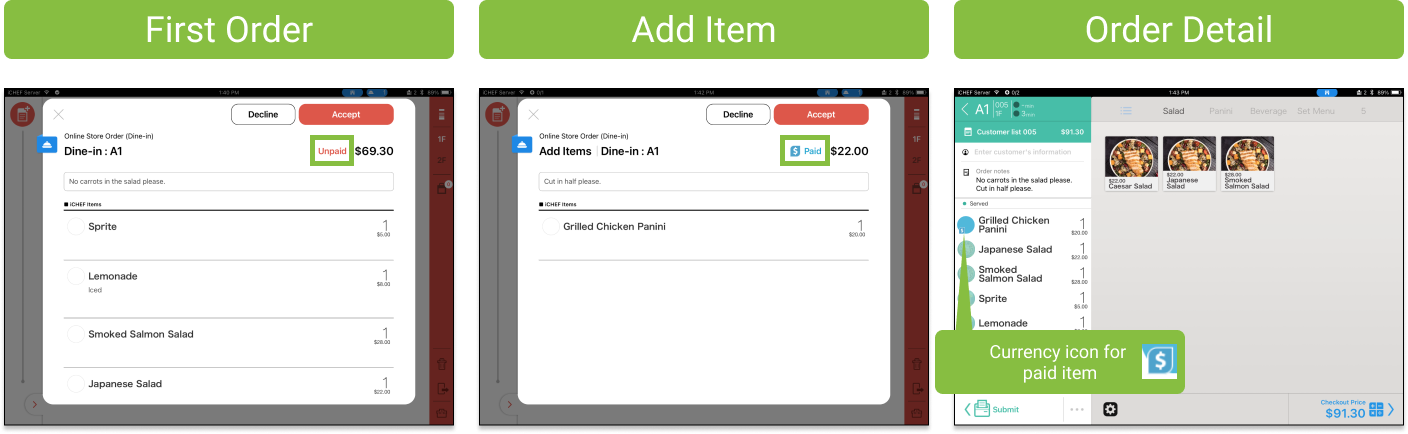
The interface of 1st & 2nd orders are basically the same, except for that the field [Number of People] is not required for the following orders.

Order Notes
Customers can leave instructions for their order. You will see the instructions in Order Confirming Window or in order details on iCHEF POS.

Payment Method
Customers can choose different payment method for added items. You can tap on the order to check details. When there is a combination of paid items and unpaid items in the same order, you’ll be able to recognize them by the [currency] icon.
Invoice Detail (TW Only)
When the first order has a unified number, the shopping cart will automatically bring the information to the subsequent orders, and the user can choose whether to check with the “same” unified number by checking the box.

To apply 2 different Tax ID for the same group of customers, you will have to create a new order on the same table by your staff.
Check Added-Items
Once you accept online dine-in orders, the kitchen tickets will be auto-printed out. If the customers add items several times, you can swipe down the ordering list to check the sequence.

| Mark on iCHEF POS | Indication |
|---|---|
| Order 0 | Original order |
| Order 1 | The second order from the same device. Customers have added items. |
| Order 2 | The third order from the same device. Customers have added items for the second time. |