
This article introduces the information and icons displayed in the system status bar of iCHEF POS, including operation mode and statuses of Wi-Fi connection, printer connection and cloud uploader.

➊ Operation Mode

It shows whether the iCHEF POS app on this iPad runs as a Cashier iPad or a Client iPad.
| Settings | Description |
|---|---|
 | Run as Cashier iPad |
 | Run as Client iPad |
➋ Status of Wi-Fi Connection

It shows if the Wi-Fi connection of this iPad is functional. Please refer to the table below for what each of the icons means.
| Settings | Status | Description |
|---|---|---|
 | No Internet | Wi-Fi is turned off. Please go to [Settings] on this iPad and toggle on [Wi-Fi]. |
 | No Internet | Wi-Fi is turned on but no network connected. |
 | No Internet | Name of the network this iPad currently connects to. However, there’s no Internet. |
 | Connected | Name of the network this iPad currently connects to. Internet connected. |
 | No Internet | This Wi-Fi is not connected to any Internet. |
 | Connected | This Wi-Fi is effectively connected to the Internet. |
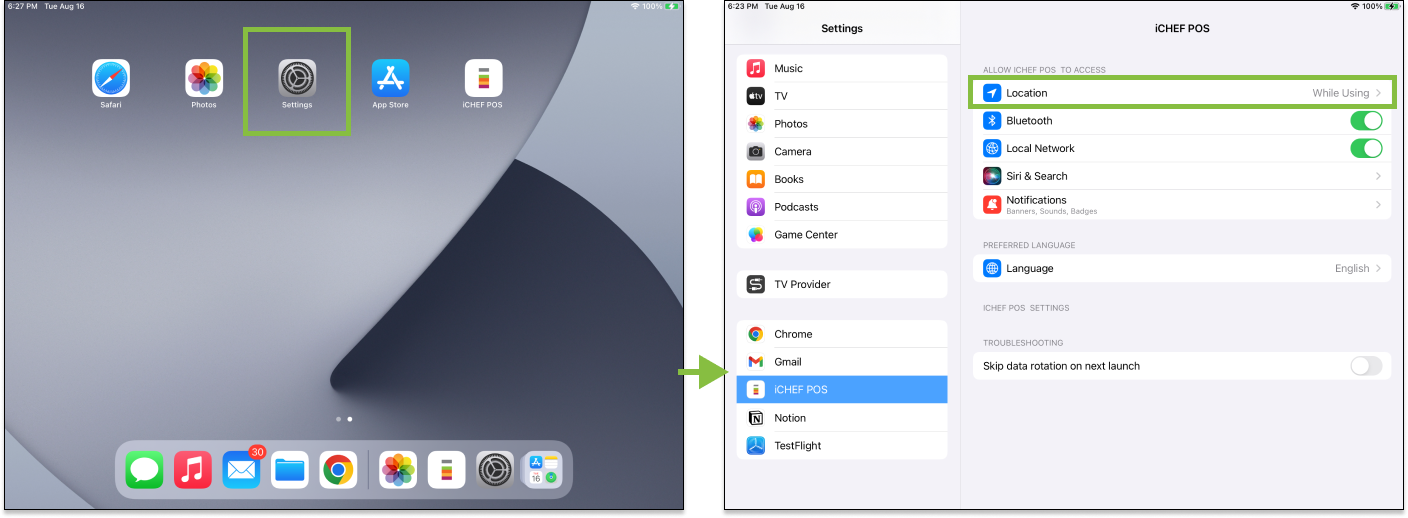
To enable iCHEF POS to access the name of Wi-Fi, please go to [Settings] on your iPad and set the option for accessing [Location] as [While using].
➌ Uploader
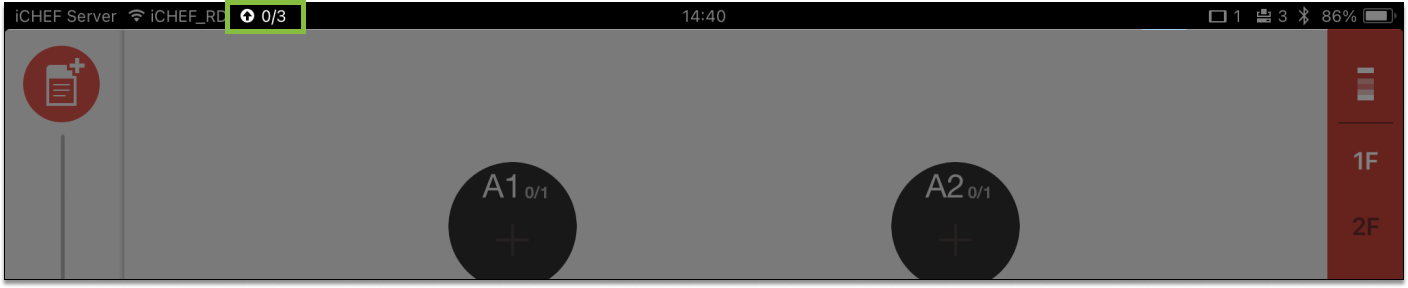
All the records of iCHEF POS, such as orders and checkout data, are stored in the uploader before being uploaded to the cloud by categories. After the cloud receives and processes the data, you can browse all of the records and analyses at iCHEF’s backend.
The status of uploader indicates how the work of data uploading goes. When the iPad is disconnected with external network, the icon turns red. Under such circumstances, please check if the iPad’s Wi-Fi is properly connected to external network. The system will automatically upload the data when the iPad is reconnected with external network.
| Settings | Description |
|---|---|
 | All of the data is uploaded to the cloud, and the cloud has already processed all the uploaded data. |
 | There are 13 entries of data to be uploaded to the cloud. The cloud has received the data and is now processing 19 entries of data. |
 | All of the data is uploaded to the cloud, and the cloud is now processing 36 entries of data. |
 | There are 3 entries of data in the uploader. The system fails to upload them to the cloud due to network disconnection. |
Click the status icon in the uploader to view the data.

If the number in [Waiting for upload] is not decreasing or shows 0 under functional network connection, please contact iCHEF customer service and provide the data in [Debug information] for us to check the status of cloud data.

➍ Present Time

It displays the present time for the iPad.
➎ Status of Online Store
If this account has enabled the functions of Mobile Ordering (Takeout/Delivery) and Dine In Self-Ordering, the system status bar will show the corresponding icons.
- Mobile Ordering enabled: Indication with a blue block.
- Mobile Ordering disabled: Indication with a gray block.
- Number: The number of orders which are to be processed.

| Status | Takeout | Dine-in |
|---|---|---|
| Mobile Ordering enabled |  |  |
| Mobile Ordering disabled (service unavailable/off-hours/modules disabled) |  |  |
| Mobile Ordering enabled and there are orders to be processed |  |  |
| Mobile Ordering disabled and there are orders to be processed |  |  |
➏ Number of Connected Client iPad

The icon only shows on the Cashier iPad. It shows the number of Client iPad that are currently connected to this iCHEF POS. This icon will not appear when there is no iPad connected.
| Settings | Description |
|---|---|
 | There is 1 Client iPad connected. |
➐ Printer Connection

The status of printer connection indicates the numbers of mapped printers and the printers that are properly connected with the iPad.
| Settings | Description |
|---|---|
 | Connection with all of the mapped printers functional. Status Functional: 2 / Mapped: 2 |
 | Some of the mapped printers disconnected. Status Functional: 1 / Mapped: 2 |
 | All of the mapped printers disconnected. Status Functional: 0 / Connected: 2 |
➑ Status of Bluetooth

It displays if this iPad grants iCHEF POS Bluetooth permission. This icon will not appear if the iPad’s Bluetooth is off or does not grant iCHEF POS this permission.
Please go to [Settings] on this iPad and set the function of [Bluetooth] as [On].

➒ Status of Battery

It shows the power level of this iPad’s battery.
| Settings | Description |
|---|---|
 | Current battery level: 41% / Charging |
 | Current battery level: 41% / Not charging |