
Discount History
- Go to Sales & Report > Discount Analysis or Sales & Report > Sales Analysis > Discount Overview
- Click the [date bar] to configure filter options

Time Settings
You can refine a data range you prefer. Maximum 93 days for better system efficiency. Minimum 1 day to view data by hours.
Advanced Options
You can filter the data by time period, number of people, or category. Category including different order types:
- *Note: To include orders checked out at [customer in line], select all order types in [category].
| Order Source / Type | Dine-in | Takeout | Delivery |
|---|---|---|---|
| iCHEF POS orders at [customer in line] | *Note | ||
| iCHEF POS dine-in orders | ✓ | ||
| iCHEF POS takeout orders | ✓ | ||
| iCHEF POS Scheduled Takeout Orders | ✓ | ||
| Online Store dine-in orders | ✓ | ||
| Online Store takeout orders | ✓ | ||
| Online Store Scheduled Takeout Orders | ✓ | ||
| Online Store delivery orders | ✓ | ||
| Third-Party Delivery takeout orders | ✓ | ||
| Third-Party Delivery delivery orders | ✓ |
Discount Overview
In discount overview, you can see the percentage comparing discount amount for current time period and the previous period. Previous time period is defined as the same time range ahead. For example, if you define the data range from Oct.14 to Oct.18 (5 days), the previous time period will be from Oct.9 to Oct.13.
- Go to Sales & Report > Discount Analysis > Discount Overview or Sales & Report > Sales Analysis > Discount Overview
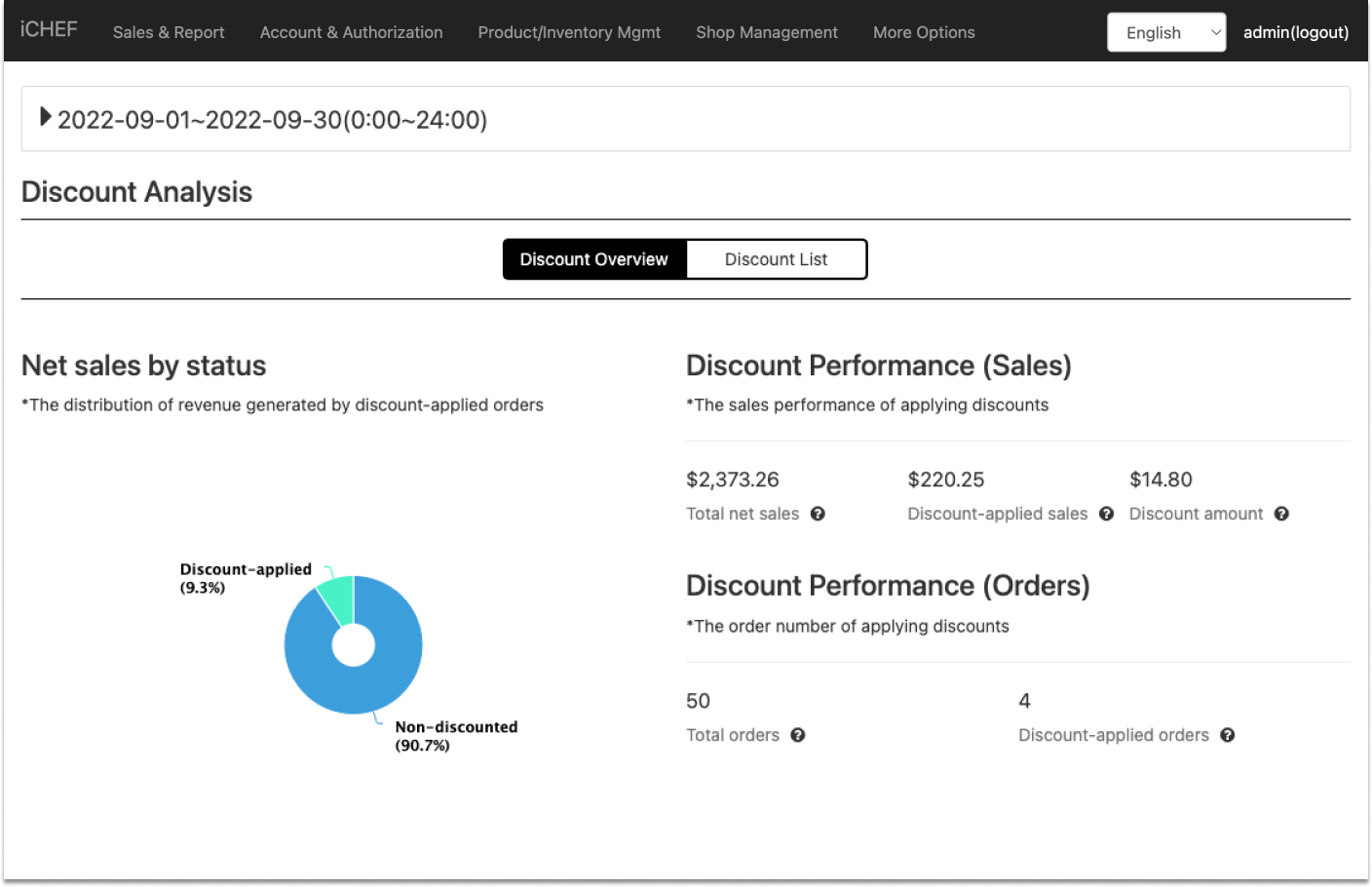
Discount Performance (Sales)
| Column | Description |
|---|---|
| A: Total Revenue | Total net sales in the selected time range. |
| Discount-applied sales | Subtotal of discount-applied orders in the selected time range. |
| Discount amount | The amount deducted in the selected time range. |
Discount Performance (Orders)
| Column | Description |
|---|---|
| Total orders | Total number of orders in the selected time range. |
| Discount-Applied Orders | Total number of discount-applied orders in the selected time range. |
Discount List
In the Discount List, you can view the performance of each discount separately.

| Column | Description |
|---|---|
| Discount title | Discount title |
| Discount Type | Whether it’s a Member Coupon or a Store discount. |
| Discount-Applied Sales (Ratio to Total Net Sales) | Total net sales of discount-applied orders in the selected time range. |
| Discount-Applied Sales | Net sales of discount-applied orders (by different sales channels) in the selected time range. |
| Discount Amount | The amount deducted (by different sales channels) in the selected time range. |
| Discount-Applied Orders | Total number of discount-applied orders (by different sales channels) in the selected time range. |
When applying multiple discounts to the same order, the sales number of different discounts will ALL include this order.
For example, discount A & discount B are both applied to the same order, and the total after discount is $200. On the sales report, [Discount-Applied Sales] of discount A & discount B will both count $200 in.