
Set up the ingredient consumption of your inventory and iCHEF POS app will deduct the inventory quantity whenever you submit an order.
Notice
- When removing an item from a sent order, the inventory deducted will not be restored. You can take stock physically once in a while to keep the records accurate.
- iCHEF POS system will NOT mark any item as “sold out” when the inventory level is under 0.
- To ensure reliability of iCHEF software for all our clients, our service level will include :
- Maximum of 10 inventory ingredients (e.g. beef, bun, lettuce) for every menu item (e.g. House burger)
- Maximum of 5 inventory ingredients (e.g. patty) for every item modifier (+ $2 for extra patty)
- Maximum of 100 inventory ingredients items tracked in total
Set up Ingredient Consumption
Individual Item
- Go to Product/Inventory Mgmt > Category
- Select an item to edit

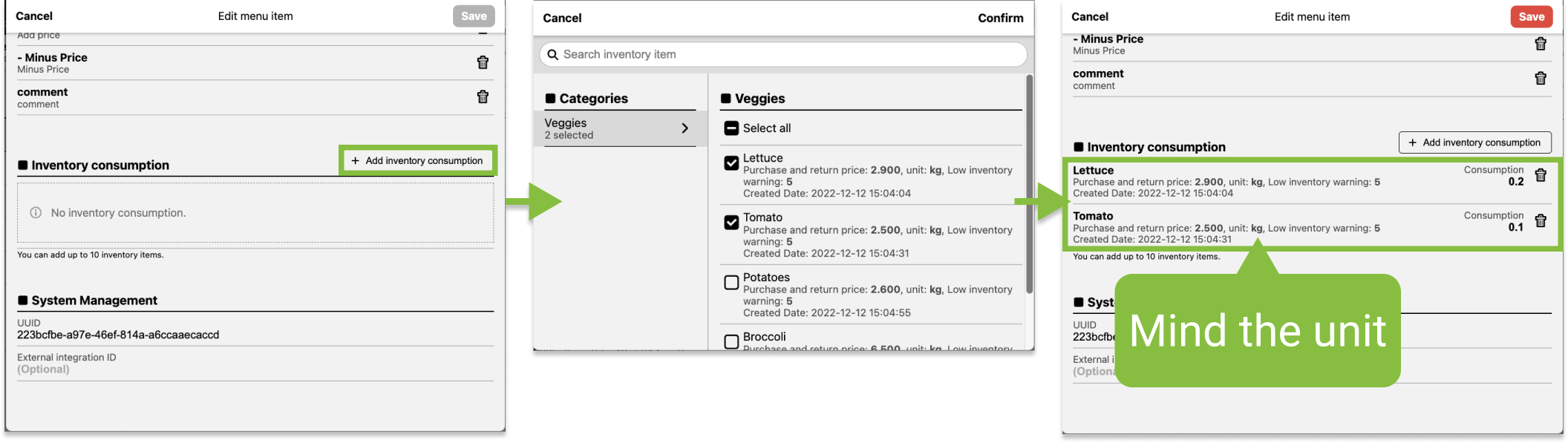
- Click [+ Add inventory consumption]
- Select the ingredient and enter the consumption
A set menu is composed by several items. Set up an ingredient consumption for a set menu only when there will be EXTRA consumption for the set menu.
- Go to Product/Inventory Mgmt > Category
- Select an item to edit

- Click [+ Add inventory consumption]
- Select the ingredient and enter the consumption

Modifier
- Go to Product/Inventory Mgmt > Item Modifiers
- Select a modifier to edit

- Click [+ Add inventory consumption]
- Select the ingredient and enter the consumption
Note that the default unit here will remain the same as your inventory settings.