
After completing Shift Closing or Daily Closing, the same information can be viewed in the backend in addition to the paper record.

How to Read It
Shift Closing is done at each meal period or staff shift to count accounts, helping stores quickly confirm revenue status.
Daily Closing organizes Shift Closing data at the end of each day and creates a closed period for each closing.
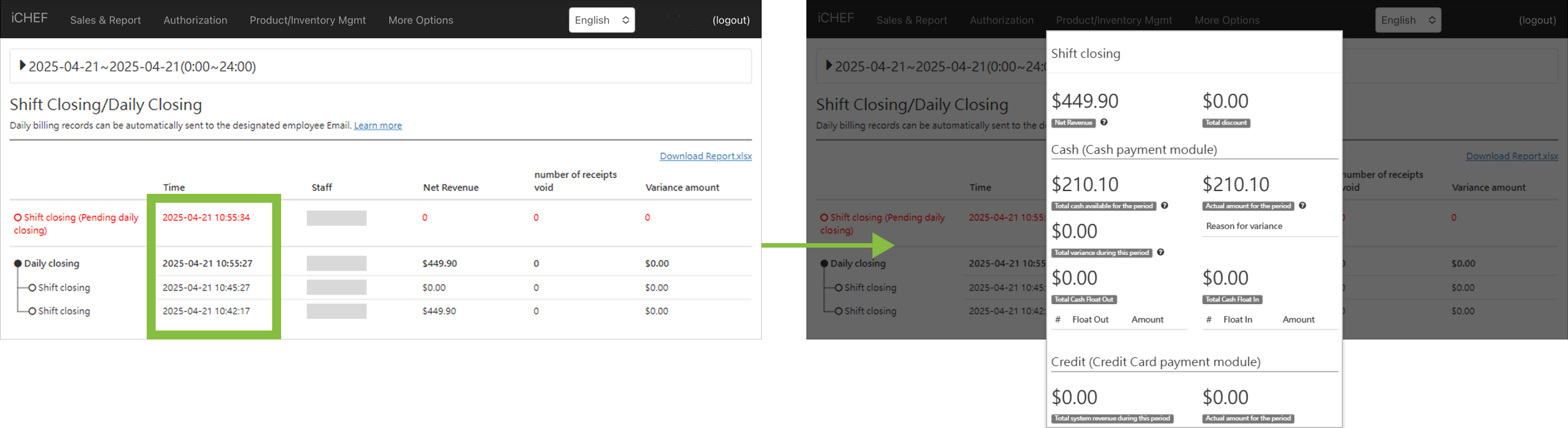
Data Description
Time
- Field Description: The time this action was performed
- Calculation Formula: None
- Additional Info: None
Staff
- Definition: The staff identified by the 4-digit employee ID.
- Formula: N/A
- Additional Info:Create Accounts & Groups
Operating Net Revenue
- Field Description: After order completion and payment, the payment amounts are summed (excluding voids).
- Calculation Formula: None
- Additional Info: None
Voided Count
- Field Description: Number of orders voided within the specified time period
- Calculation Formula: None
- Additional Info: None
Variance Amount
- Field Description: The system calculates the difference between the expected amount and the actual shift closing amount.
- Calculation Formula: Shift Closing Amount – System Expected Amount
- Additional Info: A positive number (over) means the shift closing amount is greater than the system expected amount. A negative number (short) means the shift closing amount is less. For more instructions, please see Shift Closing.