After completing the Daily Closing, you can view Shift Closing and Daily Closing records in the backend. You can also set the “Report Delivery Email” in Account & Permissions. The system will automatically send the Daily Closing records to the specified email after each closing.
Daily Closing Record
How to send email notification:
- Please go to backend Authorization
- Select an account
- Enter email in “Email for password reset”

If the “Report Delivery Email” field does not appear after selecting the account, it means the account’s group does not have the “Daily Closing Report Delivery”
- Go to Authorization
- Find [send daily report] and select the account groups

Shift Closing/Daily Closing Report
After completing Shift Closing or Daily Closing, you can check the day’s revenue on paper slips or view online versions in Reports > Shift Closing/Daily Closing.

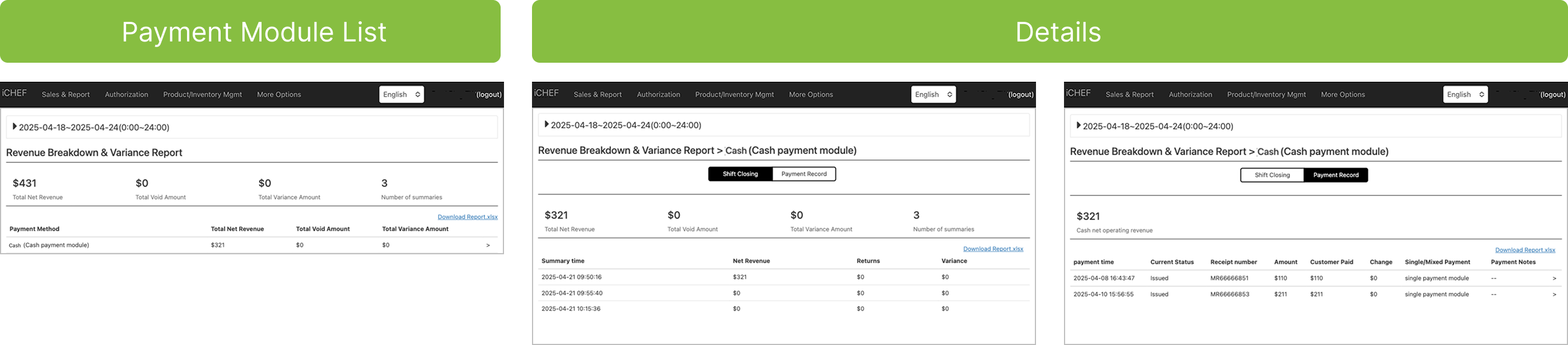
Revenue Breakdown & Variance Report
To query totals for a specific period, go to Reports > Net Revenue & Cash Float In/Out. The system will show the Shift Closing totals for the selected period by payment module. You can also click the payment module name for more details.