Unconfirmed orders from delivery platform will be listed in the Order Confirming Window, and will be listed in Takeout/delivery Area after accepted.
Order Confirming Window
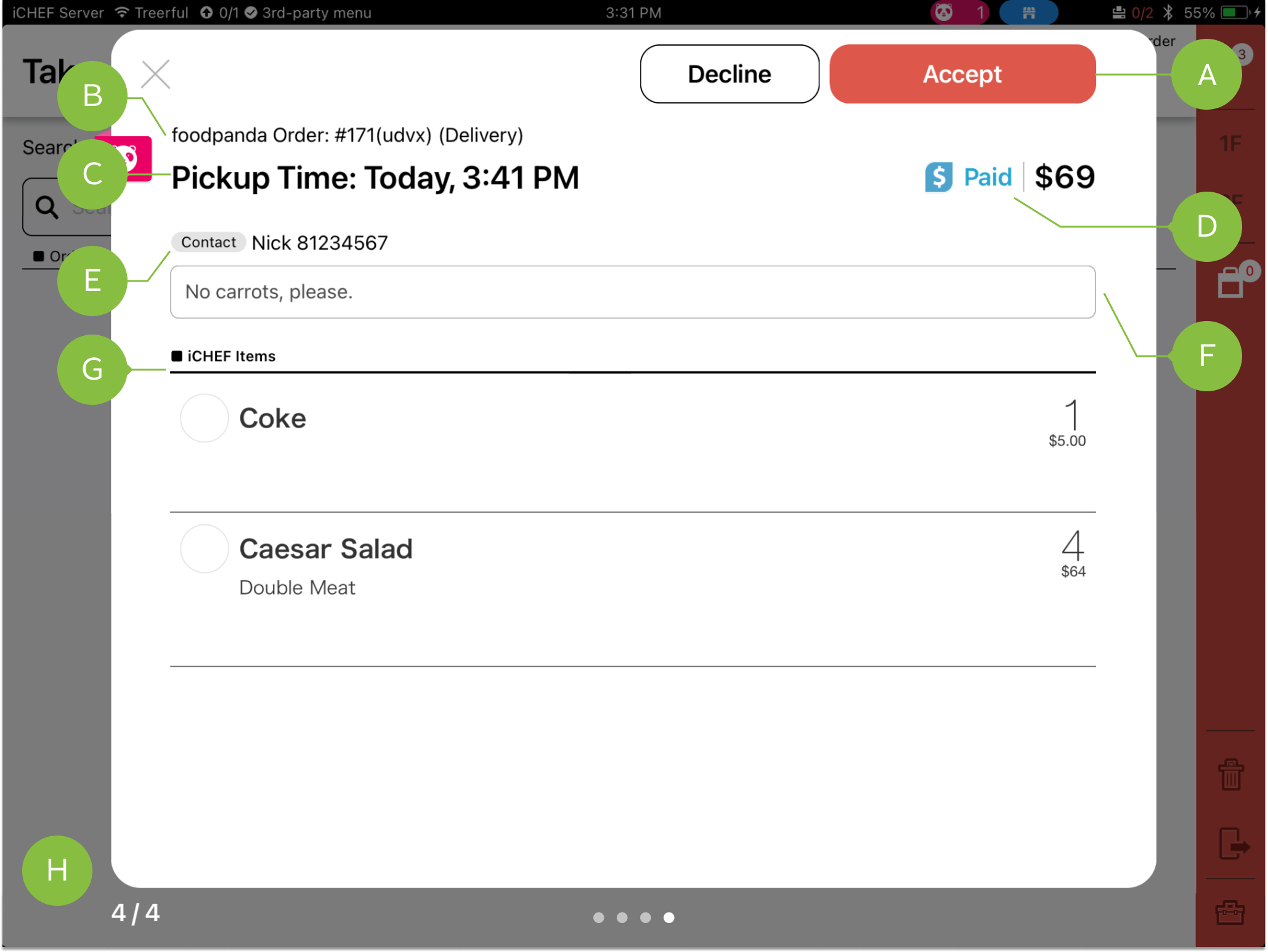
When there are new orders from delivery platform, you will receive a push notification and a sound reminder on iCHEF POS. And the orders will be listed chronologically in a pop-up window.
A: Confirm Orders
- Accept: Orders will be created at takeout/delivery area on iCHEF POS, and the customers will be informed.
- Decline: Orders will be removed from iCHEF POS, and you can send a decline message to the customer.
New orders from GrabFood will be accepted automatically, and the customers will be informed.
B: Order Type & Source
Shows the delivery platform (e.g. foodpanda, GrabFood), the order type (e.g. takeout, delivery), and certain information from the delivery platform.
- Uber Eats: Order number for customers
- foodpanda: Order number for the rider & order number for customers
C: Pickup/Delivery Time
The estimated time the rider/customer pick up the meal.
D: Total & Payment Status
This amount is subject to the amount provided by the delivery platform.
E: Customer Info
According to the privacy policy of different platform, the customer info will show differently:
- Uber Eats: Customer name and the contact number of Uber Eats.
- foodpanda: No customer info provided.
F: Order Notes
Notes that customers left for the order on the third-party delivery platform.
G: Order Items
Items that the customers order on the third-party delivery platform. Note: If you have changed the item’s name displayed on the delivery platform, items’ name listed here or printed on the tickets will remain as the original name.
H: Amount of Unconfirmed Orders
This amount shows when you have more than 2 unconfirmed orders. When there are more than 5 orders, you’ll find a button of “Return to first order”.
Unconfirmed orders will be listed chronologically by pickup/delivery time.
Order List
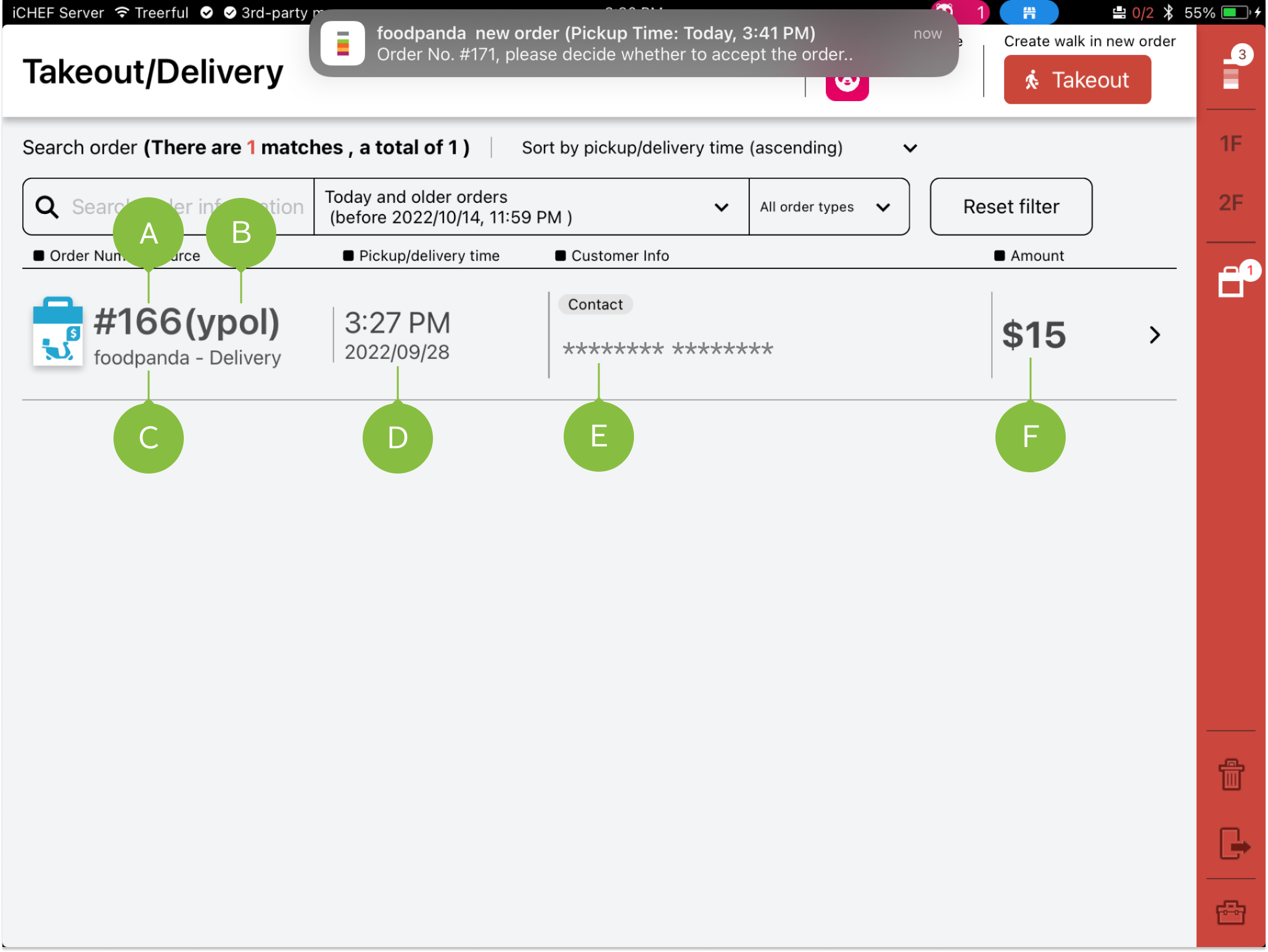
Once you accept the order in Order Confirming Window, the order will be listed here and you can find a specific order by the filter.
A / B : Order Number
The format of order number differs according to different delivery platform:
- Uber Eats: Order number for customers
- foodpanda: Order number for the rider & order number for customers
C: Order Type & Source
Shows the delivery platform (e.g. foodpanda, GrabFood), and the order type (e.g. takeout, delivery).
D: Pickup/Delivery Time
The estimated time the rider/customer pick up the meal.
E: Customer Info
According to the privacy policy of different platform, the customer info will show differently:
- Uber Eats: Customer name and the contact number of Uber Eats.
- foodpanda: No customer info provided.
F: Amount
This amount is subject to the amount provided by the delivery platform.
According to the “foodpanda official explanation“, the invoice/transaction details issued by the store only need to calculate the meal amount and the Vendor (store’s responsibility) discount; the remaining amount will be separately issued to the consumer by foodpanda.
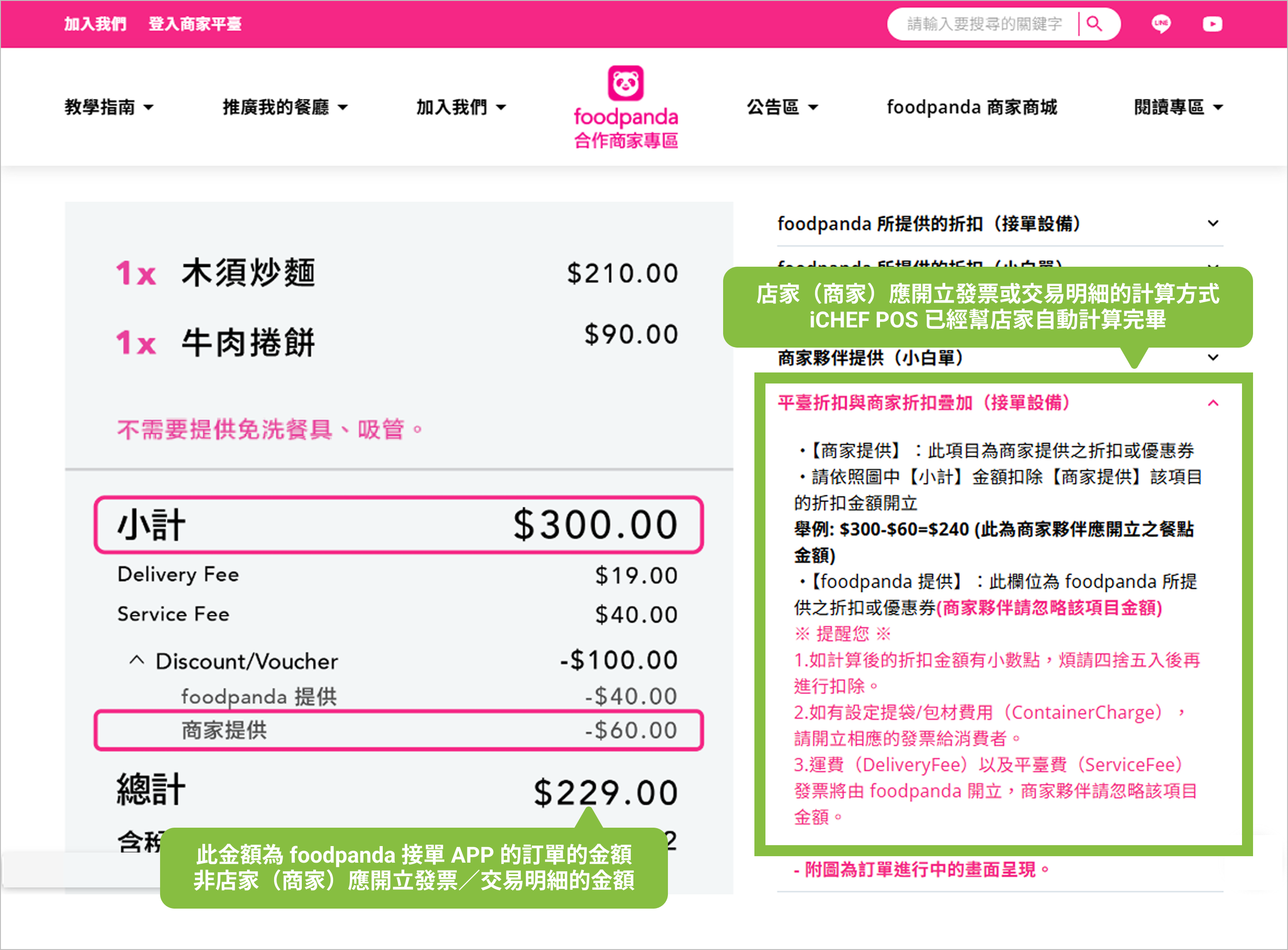
Since the invoice/transaction details checkout amount displayed in iCHEF POS has been calculated according to the rules of “merchants should issue invoices/transaction details” by foodpanda, it is normal for the iCHEF checkout amount to differ from the order amount in the foodpanda order-taking app. Please rest assured.
Order Filter
Options for sorting takeout/delivery orders.

Search orders with keywords, such as name, phone number and order number.

Sort by pickup/deliver time.

Sort by ways of picking up the meals.
Clear all of the conditions and reset filter.