
Please check the LED light status on the printer, each LED independently indicates status or error information.
LED Light Display and Troubleshooting
Supported order printer models vary by restaurant location with iCHEF.Learn More
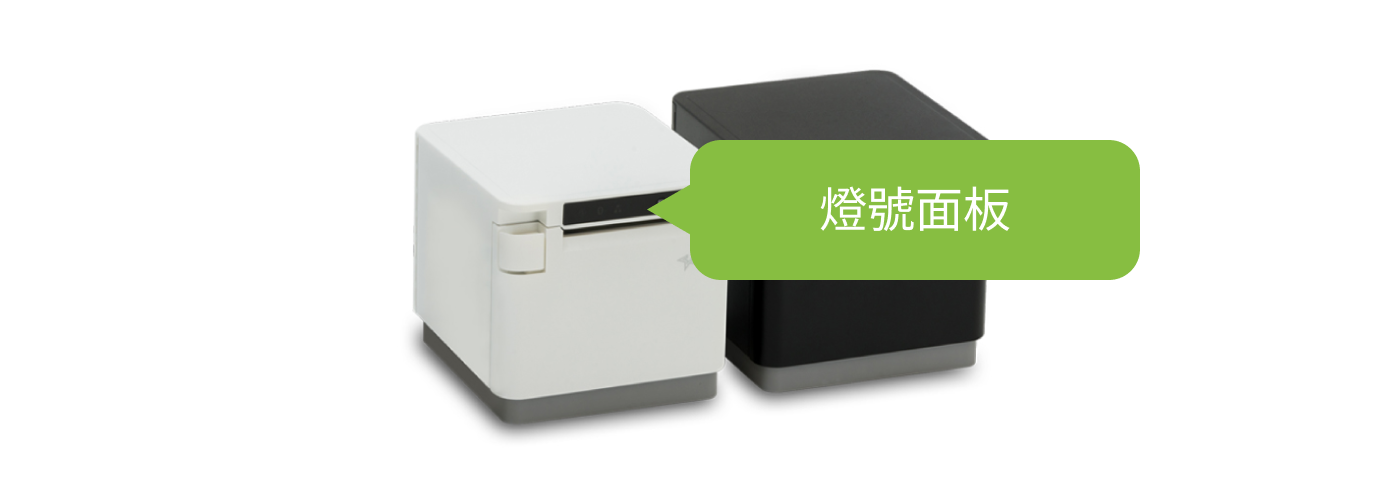
LED Light panel position
Normal Power Light Status

Power off
- Indicator lights: All off
- Check: After confirming the power cable, turn on the receipt printer power.

Standby mode
- Indicator light: Blue light steady on
- Check: Normal indicator lights, no inspection needed.
LAN indicator light

Network connected
- Indicator lights: Blue light steady on, green light steady on
- Check: Normal indicator lights, no inspection needed.

Physical network cable disconnected
- Indicator lights: Blue light steady on, green light off
- Check:
- USB connection: Normal indicator light, no inspection required.
- LAN connection: Check if the network cable is loose or replace the network cable.

Unable to obtain IP address
- Indicator lights: Blue light steady on, green light flashing
- Check: Restart the router and the receipt printer, and verify that the network cable is properly connected.
Warning indicator light

The cable has no data transmission function (charging only)
- Indicator lights: Blue light turns on, then alternates flashing with the red light 5 times
(After 5 seconds, returns to normal indicator light) - Check: Verify whether an Apple-certified cable is being used.Learn More

Connect the USB hub
- Indicator lights: Blue light turns on, then alternates flashing with the red light 10 times
(After 5 seconds, returns to normal indicator light) - Check: Remove the hub and connect the iPad directly to the receipt printer.
Overheat indicator light (automatic repair during printing)

Print head overheating
- Indicator light: Blue light flashes once every 2 seconds
- Check: Are there any heat-generating appliances near the receipt printer?
(No need to turn off the receipt printer; it will automatically resume once the temperature drops.)

Motherboard overheating
- Indicator light: The blue light flashes twice every 2 seconds
- Check: Are there any heat-generating appliances near the receipt printer?
(No need to turn off the receipt printer; it will automatically resume once the temperature drops.)
Paper roll and cutter indicator lights

The paper roll cover is open.
- Indicator light: Red light steady on
- Check: Close the paper roll cover again.Learn More

Paper roll is running low
- Indicator lights: Blue light turns on, then alternates flashing with the red light every 3 seconds
- Check: Verify the remaining paper roll and find a suitable time to replace it.
(Note: For informational reminder only; the printer can still operate normally.)

Paper roll is out.
- Indicator light: Red light flashes continuously every 0.5 seconds
- Check: Replace the paper roll.Learn More

Cutter error (paper jam)
- Indicator light: Purple light flashes continuously every 0.25 seconds
- Check: Complete the manual reset of the cutter.Learn More
Please manually reset the cutter before opening the paper roll cover. Do not force it open.
Error Display

Voltage abnormality
- Indicator light: Purple light flashes once every 2 seconds
- Check: Plug the power cord directly into the wall outlet (avoid using extension cords).
(If the issue persists, please contact iCHEF)

Printhead error
- Indicator light: Purple light flashes twice every 2 seconds
- Check: Restart the receipt printer.
(If the issue persists, please contact iCHEF)

Memory error
- Indicator light: Purple light flashes 4 times every 2 seconds
- Check: Restart the receipt printer.
(If the issue persists, please contact iCHEF)

Memory error
- Indicator light: Purple light flashes 5 times every 2 seconds
- Check: Restart the receipt printer.
(If the issue persists, please contact iCHEF)

Memory error
- Indicator light: Purple light flashes 6 times every 2 seconds
- Check: Restart the receipt printer.
(If the issue persists, please contact iCHEF)

Firmware error
- Indicator light: Purple light flashes 7 times every 2 seconds
- Check: Restart the receipt printer.
(If the issue persists, please contact iCHEF)
LED Light panel position

Normal Power Light Status

Power off
- Indicator lights: All off
- Check: After confirming the power cable, turn on the receipt printer power.

Standby mode
- Indicator light: Blue light is steady on, red light is off
- Check: Normal indicator lights, no inspection needed.

Bluetooth resetting
- Indicator lights: Blue and red lights flash simultaneously 2 times every 2 seconds
- Check: The ticket printer is currently undergoing Bluetooth reset.Learn More
Warning indicator light

Charging the iPad
- Indicator lights: Blue light turns on, then flashes simultaneously with the red light 9 times
(After 5 seconds, returns to normal indicator light) - Check: Normal indicator lights, no inspection needed.

The cable has no data transmission function (charging only)
- Indicator lights: Blue and red lights flash alternately
(Returns to normal indicator lights after 5 seconds) - Check: Verify whether an Apple-certified cable is being used.Learn More

Connect the USB hub
- Indicator light: Blue light turns on, then alternately flashes with the red light
(After 5 seconds, returns to normal indicator light) - Check: Remove the hub and connect the iPad directly to the receipt printer.
Overheat indicator light

Print head overheating
- Indicator light: Blue light flashes once every 2 seconds
- Check: Are there any heat-generating appliances near the receipt printer?
(No need to turn off the receipt printer; it will automatically resume once the temperature drops.)

Motherboard overheating
- Indicator light: The blue light flashes twice every 2 seconds
- Check: Are there any heat-generating appliances near the receipt printer?
(No need to turn off the receipt printer; it will automatically resume once the temperature drops.)
Paper roll and cutter indicator lights

The paper roll cover is open.
- Indicator lights: Blue light steady on, red light steady on
- Check: Close the paper roll cover again.Learn More

Paper roll is out.
- Indicator lights: Blue light steady on, red light continuously flashes every 0.5 seconds
- Check: Replace the paper roll.Learn More

Unable to open the cash drawer
- Indicator lights: Blue light steady on, red light flashes once every 2 seconds
- Check: Ensure there are no foreign objects obstructing the inside of the cash drawer, and that no overweight items have been placed inside.Method to forcibly open the cash drawer

Cutter error (paper jam)
- Indicator lights: Blue light off, red light continuously flashes every 0.5 seconds
- Check: Ensure the cutter has returned to its home position.Learn More
Please return the cutter to its home position before opening the paper roll cover. Do not force it open.
Error Display

Voltage abnormality
- Indicator light: Red light flashes once every 2 seconds
- Check: Plug the power cord directly into the wall outlet (avoid using extension cords).
(If the issue persists, please contact iCHEF)

Printhead error
- Indicator light: Red light flashes twice every 2 seconds
- Check: Restart the receipt printer.
(If the issue persists, please contact iCHEF)

Bluetooth malfunction
- Indicator light: Red light flashes three times every 2 seconds
- Check: Restart the printer
(If the issue persists, please contact iCHEF)

Memory error
- Indicator light: Red light flashes four times every 2 seconds
- Check: Restart the receipt printer.
(If the issue persists, please contact iCHEF)

Memory error
- Indicator light: Red light flashes five times every 2 seconds
- Check: Restart the receipt printer.
(If the issue persists, please contact iCHEF)

Memory error
- Indicator light: Red light flashes six times every 2 seconds
- Check: Restart the receipt printer.
(If the issue persists, please contact iCHEF)
LED Light panel position

Normal Power Light Status

Power off
- Indicator lights: All off
- Check: After confirming the power cable, turn on the receipt printer power.

Standby mode
- Indicator light: Blue light is steady on, red light is off
- Check: Normal indicator lights, no inspection needed.
Warning indicator light

Charging the iPad
- Indicator light: Blue light turns on, then flashes simultaneously with the red light 10 times
(After 5 seconds, returns to normal indicator light) - Check: Normal indicator lights, no inspection needed.
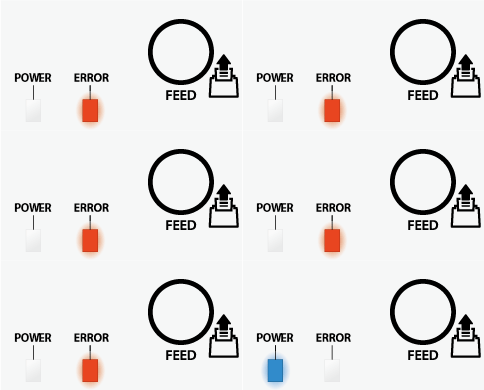
Connect the USB hub
- Indicator light: Blue light turns on, then alternately flashes with the red light
(After 5 seconds, returns to normal indicator light) - Check: Remove the hub and connect the iPad directly to the receipt printer.
LAN indicator light
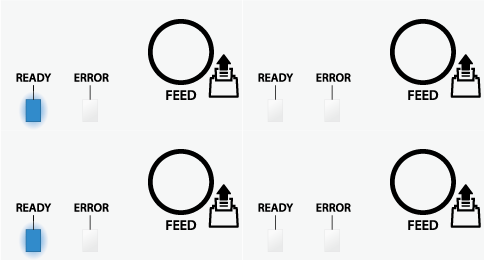
Physical network cable disconnected
- Indicator light: Blue light flashes twice every 1 second
- Check: Verify if the network cable is loose, or replace the network cable.

Unable to obtain IP address
- Indicator light: Blue light flashes continuously at intervals of 0.25 seconds
- Check: Restart the router and the receipt printer, and verify that the network cable is properly connected.
Overheat indicator light

Print head overheating
- Indicator light: Blue light flashes once every 1 second
- Check: Are there any heat-generating appliances near the receipt printer?
(No need to turn off the receipt printer; it will automatically resume once the temperature drops.)

Motherboard overheating
- Indicator light: Blue light flashes once every 2 seconds
- Check: Are there any heat-generating appliances near the receipt printer?
(No need to turn off the receipt printer; it will automatically resume once the temperature drops.)
Paper roll and cutter indicator lights

The paper roll cover is open.
- Indicator lights: Blue light steady on, red light steady on
- Check: Close the paper roll cover again.Learn More

Paper roll is out.
- Indicator light: Blue light steady on, red light flashes continuously at intervals of 0.5 seconds
- Check: Replace the paper roll.Learn More

Cutter error (paper jam)
- Indicator light: Blue light off, red light flashes continuously at intervals of 0.25 seconds
- Check: Complete the manual reset of the cutter.Learn More
Please manually reset the cutter before opening the paper roll cover. Do not force it open.
Error Display

Voltage abnormality
- Indicator lights: Blue and red lights flash simultaneously once every 1 second.
- Check: Plug the power cord directly into the wall outlet (avoid using extension cords).
(If the issue persists, please contact iCHEF)

Motherboard malfunction
- Indicator lights: Blue and red lights flash once simultaneously every 2 seconds
- Check: Restart the receipt printer.
(If the issue persists, please contact iCHEF)

Printhead error
- Indicator lights: Blue and red lights flash simultaneously once every 0.5 seconds.
- Check: Restart the receipt printer.
(If the issue persists, please contact iCHEF)

Memory error
- Indicator lights: Blue and red lights flash simultaneously once every 0.25 seconds.
- Check: Restart the receipt printer.
(If the issue persists, please contact iCHEF)

Memory error
- Indicator lights: Blue light off, red light steady on.
- Check: Restart the receipt printer.
(If the issue persists, please contact iCHEF)
LED Light panel position

Normal Power Light Status

Power off
- Indicator lights: All off
- Check: After confirming the power cable, turn on the receipt printer power.

Standby mode
- Indicator lights: Blue light steady on, green light steady on
- Check: Normal indicator lights, no inspection needed.
LAN connection indicator light

Physical network cable disconnected
- Indicator lights: Blue light steady on, green light off
- Check: Verify if the network cable is loose, or replace the network cable.

Unable to obtain IP address
- Indicator lights: Blue light steady on, green light flashing
- Check: Restart the router and the receipt printer, and verify that the network cable is properly connected.
Overheat indicator light

Print head overheating
- Indicator light: Blue light flashes once every 0.5 seconds
- Check: Are there any heat-generating appliances near the receipt printer?
(No need to turn off the receipt printer; it will automatically resume once the temperature drops.)

Motherboard overheating
- Indicator light: Blue light flashes once every 1 second
- Check: Are there any heat-generating appliances near the receipt printer?
(No need to turn off the receipt printer; it will automatically resume once the temperature drops.)
Paper roll and cutter indicator lights

The paper roll cover is open.
- Indicator lights: Blue light steady on, red light steady on
- Check: Close the paper roll cover again.Learn More

Paper roll is out.
- Indicator lights: Blue light steady on, red light flashing
- Check: Replace the paper roll.Learn More

Cutter error (paper jam)
- Indicator lights: Blue light off, red light flashing
- Check: Complete the manual reset of the cutter.Learn More
Please manually reset the cutter before opening the paper roll cover. Do not force it open.
Error Display

Voltage abnormality
- Indicator lights: Blue and red lights flash once simultaneously every 2 seconds
- Check: Plug the power cord directly into the wall outlet (avoid using extension cords).
(If the issue persists, please contact iCHEF)

Printhead error
- Indicator lights: Blue and red lights flash simultaneously once every 1 second.
- Check: Restart the receipt printer.
(If the issue persists, please contact iCHEF)

Memory error
- Indicator lights: Blue and red lights flash simultaneously once every 0.5 seconds.
- Check: Restart the receipt printer.
(If the issue persists, please contact iCHEF)

Memory error
- Indicator lights: Blue light off, red light steady on.
- Check: Restart the receipt printer.
(If the issue persists, please contact iCHEF)

Memory error
- Indicator lights: Blue light off, red light flashes 4 times per cycle.
- Check: Restart the receipt printer.
(If the issue persists, please contact iCHEF)

Firmware error
- Indicator lights: Blue light off, red light flashes 7 times per cycle.
- Check: Restart the receipt printer.
(If the issue persists, please contact iCHEF)
LED Light panel position

Normal Power Light Status

Power off
- Indicator lights: All off
- Check: After confirming the power cable, turn on the receipt printer power.

Standby mode
- Indicator lights: Green light steady on, red light off
- Check: Normal indicator lights, no inspection needed.
LAN connection indicator light

Physical network cable disconnected
- Indicator lights: Green and red lights flash once simultaneously every 2 seconds
- Check: Verify if the network cable is loose, or replace the network cable.

Unable to obtain IP address
- Indicator lights: Green and red lights flash continuously every 0.25 seconds
- Check: Restart the router and the receipt printer, and verify that the network cable is properly connected.
Overheat indicator light

Print head overheating
- Indicator light: Only the green light flashes once every 1 second
- Check: Are there any heat-generating appliances near the receipt printer?
(No need to turn off the receipt printer; it will automatically resume once the temperature drops.)
Paper roll and cutter indicator lights
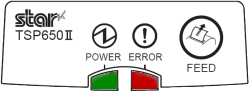
The paper roll cover is open.
- Indicator lights: Green light steady on, red light steady on
- Check: Close the paper roll cover again.Learn More

Paper roll is running low
- Indicator lights: Green light steady on, red light flashes once every 2 seconds
- Action: Check the paper roll supply and find an appropriate time to replace it.
(Note: For informational reminder only; the printer can still operate normally.)

Paper roll is out
- Indicator lights: Green light steady on, red light continuously flashes every 0.5 seconds
- Action: Replace the paper roll.Learn More

Cutter error (paper jam)
- Indicator light: Only the red light continuously flashes every 0.25 seconds
- Action: Complete the manual reset of the cutter.Learn More
Please manually reset the cutter before opening the paper roll cover. Do not force it open.
Error Display
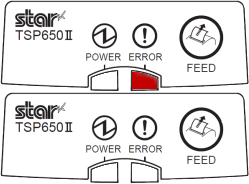
Voltage abnormality
- Indicator light: Red light flashes once every 3 seconds
- Check: Plug the power cord directly into the wall outlet (avoid using extension cords).
(If the issue persists, please contact iCHEF)

Memory error
- Indicator light: Red light flashes once every 0.5 seconds
- Check: Restart the receipt printer.
(If the issue persists, please contact iCHEF)

Memory error
- Indicator light: Red light flashes once every 1 second
- Check: Restart the receipt printer.
(If the issue persists, please contact iCHEF)

Memory error
- Indicator light: Red light flashes once every 1.5 seconds
- Check: Restart the receipt printer.
(If the issue persists, please contact iCHEF)

Printhead error
- Indicator light: Red light flashes once every 2 seconds
- Check: Restart the receipt printer.
(If the issue persists, please contact iCHEF)
LED Light panel position
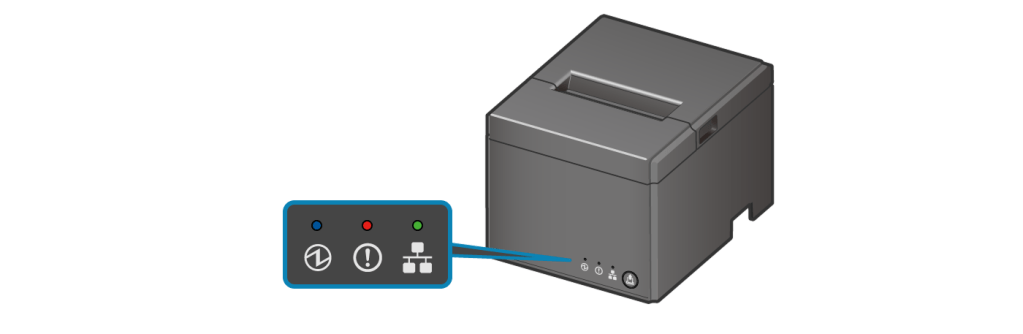
Normal Power Light Status
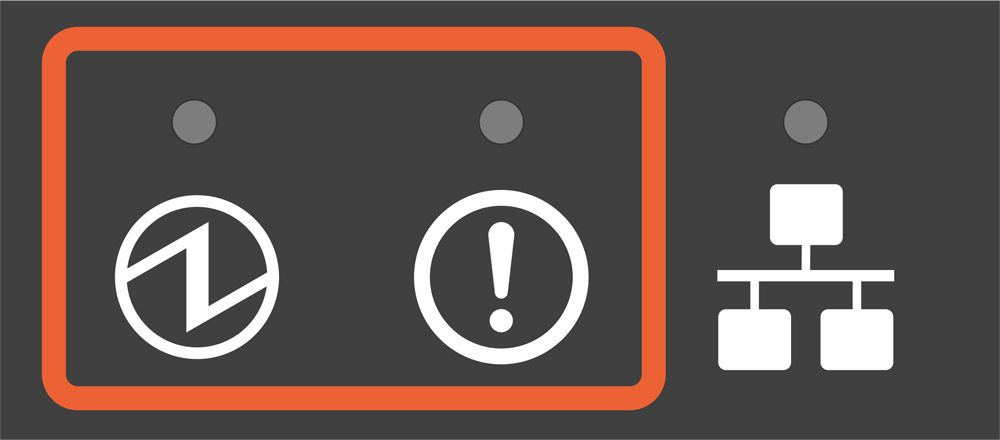
Power off
- Indicator lights: All off
- Check: After confirming the power cable, turn on the receipt printer power.
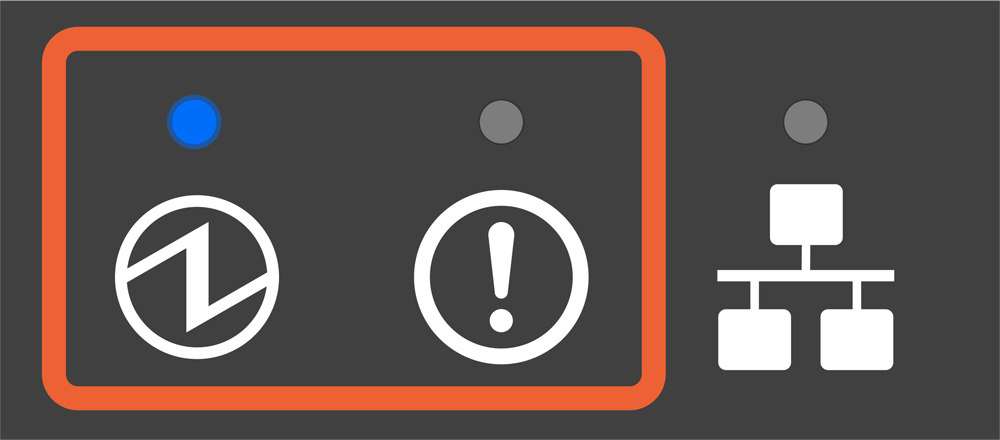
Standby mode
- Indicator lights: Blue light steady on; red light off
- Check: Normal indicator lights, no inspection needed.
LAN connection indicator light
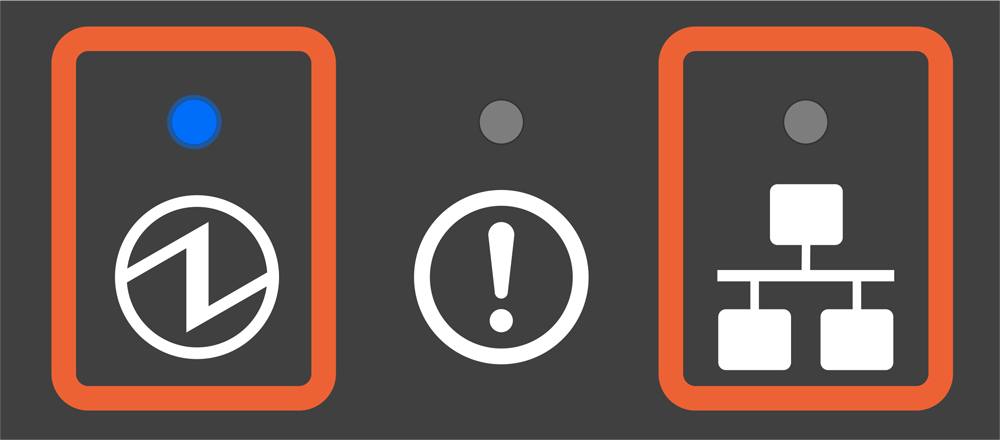
Physical network cable disconnected
- Indicator lights: Blue light steady on, green light off
- Check: Verify if the network cable is loose, or replace the network cable.

Unable to obtain IP address
- Indicator lights: Blue light steady on, green light flashing
- Check: Restart the router and the receipt printer, and verify that the network cable is properly connected.
Overheat indicator light
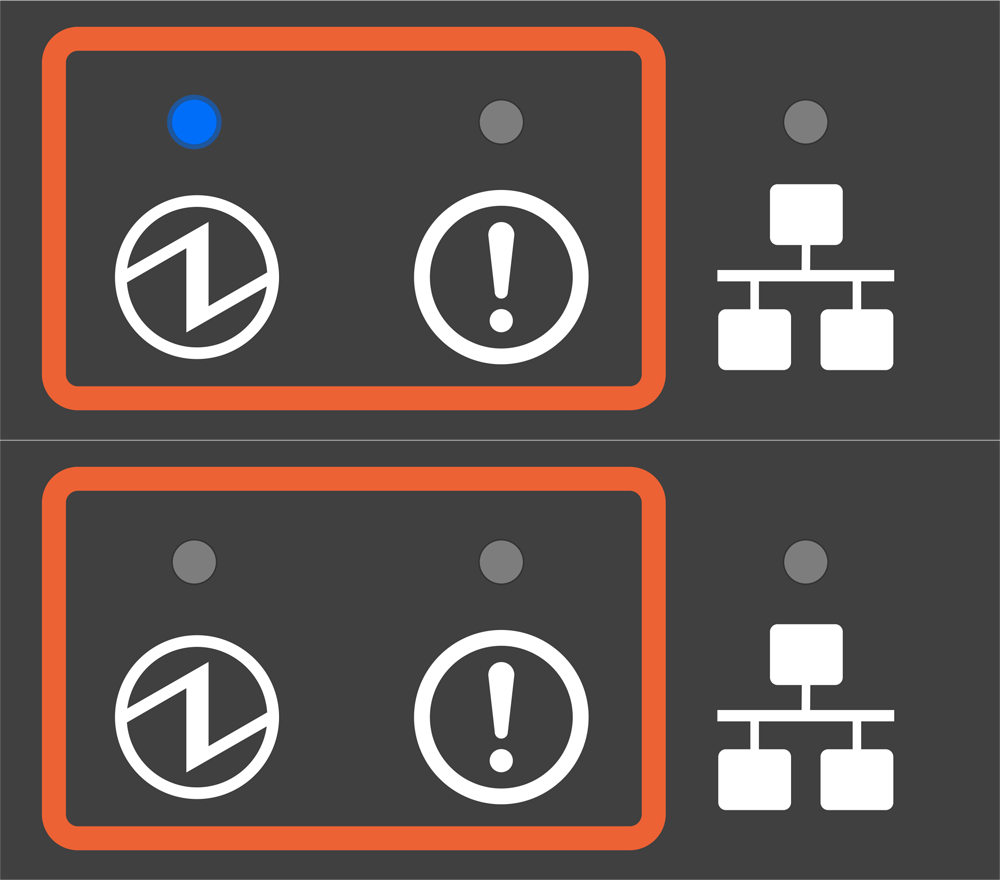
Print head overheating
- Indicator light: Blue light flashes once every 0.5 seconds
- Check: Are there any heat-generating appliances near the receipt printer?
(No need to turn off the receipt printer; it will automatically resume once the temperature drops.)

Motherboard overheating
- Indicator light: Blue light flashes once every 2 seconds
- Check: Are there any heat-generating appliances near the receipt printer?
(No need to turn off the receipt printer; it will automatically resume once the temperature drops.)
Paper roll and cutter indicator lights

The paper roll cover is open.
- Indicator lights: Blue light steady on, red light steady on
- Check: Close the paper roll cover again.Learn More

Paper roll is out.
- Indicator lights: Blue light steady on, red light flashing
- Check: Replace the paper roll.Learn More

Cutter error (paper jam)
- Indicator lights: Blue light off, red light flashing
- Check: Complete the manual reset of the cutter.Learn More
Please manually reset the cutter before opening the paper roll cover. Do not force it open.
Error Display

Voltage abnormality
- Indicator lights: Blue and red lights flash simultaneously once every 1 second.
- Check: Plug the power cord directly into the wall outlet (avoid using extension cords).
(If the issue persists, please contact iCHEF)

Printhead error
- Indicator lights: Blue and red lights flash simultaneously once every 0.5 seconds.
- Check: Restart the receipt printer.
(If the issue persists, please contact iCHEF)
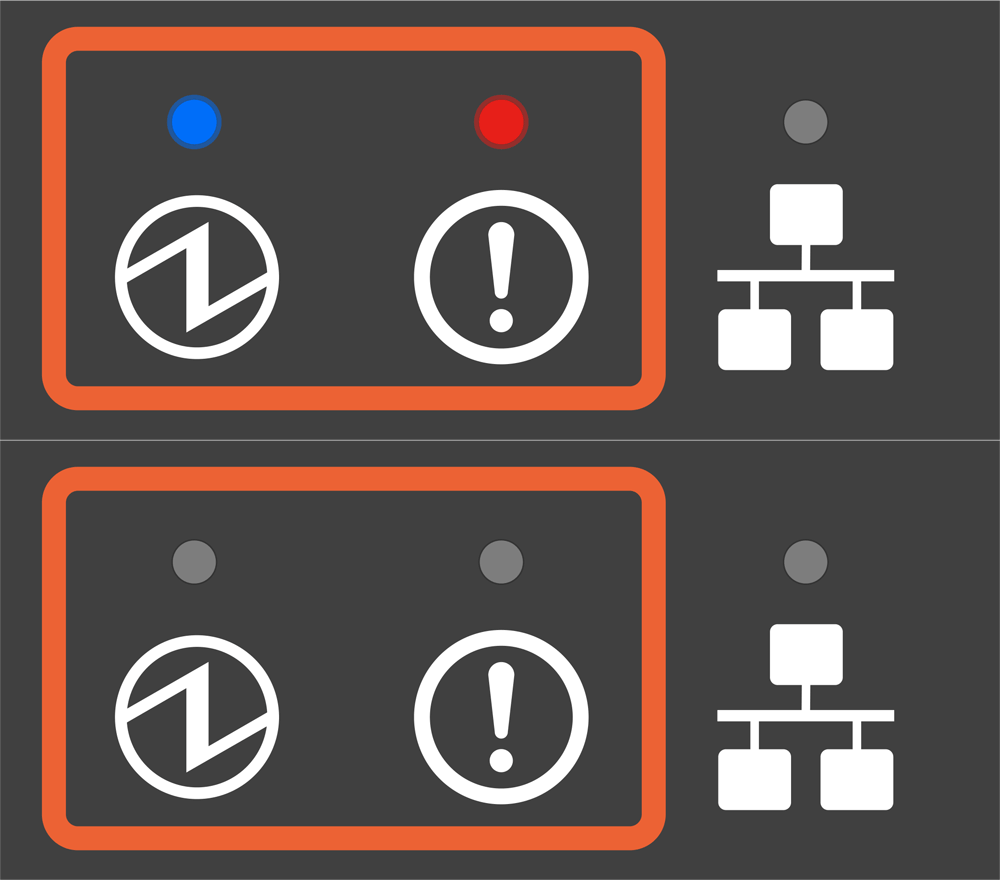
Memory error
- Indicator lights: Blue and red lights flash simultaneously once every 0.25 seconds.
- Check: Restart the receipt printer.
(If the issue persists, please contact iCHEF)

Memory error
- Indicator lights: Blue light off, red light steady on.
- Check: Restart the receipt printer.
(If the issue persists, please contact iCHEF)

Memory error
- Indicator lights: Blue light off, red light flashes 4 times per cycle.
- Check: Restart the receipt printer.
(If the issue persists, please contact iCHEF)

Firmware error
- Indicator lights: Blue light off, red light flashes 7 times per cycle.
- Check: Restart the receipt printer.
(If the issue persists, please contact iCHEF)
LED Light panel position

Normal Power Light Status

Power off
- Indicator lights: All off
- Check: After confirming the power cable, turn on the receipt printer power.

Standby mode
- Indicator light: Green light steady on
- Check: Normal indicator lights, no inspection needed.
Overheat indicator light

Print head overheating
- Indicator light: Red light blinking
- Check: Are there any heat-generating appliances near the receipt printer?
(No need to turn off the receipt printer; it will automatically resume once the temperature drops.)
Paper roll indicator light

Paper roll is out
- Indicator light: Red light steady on and emits 2 beeps
- Check: Replace the paper roll.Learn More