
When it’s peak time and guests keep coming, and you’re struggling to keep up with clearing tables or politely reminding diners about their time limit? Don’t worry! Just set up the time rules in the backend, and the system will handle the reminders automatically!

This will enhance the service experience for both your current diners and the next group waiting. Depending on the features you’ve enabled, you can use these functions in different ways:
| Type | Feature Name | Applicable Users | Reminder Content |
|---|---|---|---|
| Basic | Waiting time alarm for total time | All iCHEF users | ✅ POS Table Timer |
| Advanced | Dining & Ordering Time Limit | Requires Mobile Ordering (Dine-in) enabled | ✅ POS Table Timer ✅ Online Ordering Time Display |
Basic: POS Table Timer
Available to all iCHEF POS users! Simply enable “Waiting time alarm for total time” on the table status page. You decide its purpose based on your operations, and when the time is up, a timer will automatically show on the table, making it easier for your front-of-house staff to spot.
➤ Backend Path:Shop Management > Storefront process and warning > Dine In Setting: Waiting time alarm for total time

🤩 How other stores use it:
Usage ❶ Service Reminder for Meals
Confirm last order requests, serve desserts before guests leave
➜ Ensure no service is missed and reminders are timely, for a more complete and thoughtful service.

Setup Example:
- Store Rule: Dining time limit of 120 minutes, want front-of-house staff to provide a specific service when 30 minutes remain.
- Backend Time Setting: 90 minutes.
- Display Result: When the group has been seated for 90 minutes, the POS table automatically shows a timer.
Usage ❷ Dining Time Reminder
No manual timing needed, allows for table cleaning time
➜ Release tables on time so the next group doesn’t wait long, speeding up operations.

Setup Example:
- Store Rule: Dining time limit of 120 minutes, want front-of-house staff to remind guests when time is up.
- Backend Time Setting: 120 minutes.
- Display Result: When the group has been seated for 120 minutes, the POS table automatically shows a timer.
Advanced: Online Ordering Time Display
A must-have for stores with Mobile Ordering (Dine-in) enabled! By setting “Dining & Ordering Time Limit,” you can display a dining time reminder directly on the ordering webpage and automatically prevent customers from ordering past the deadline.
When this feature is enabled, the dining time limit will override the above “Waiting time alarm for total time” setting. A timer will automatically show on the table when the dining time ends.
➤ Backend Path: Online Store > Mobile Ordering (Dine-in) > Dining & Ordering Time Limit

🤩 How other stores use it:
Usage ❶ Fully Automated Online Reminders
Customers can check remaining time online, and ordering is automatically blocked when time is up
➜ Prevents late orders, no rush for meal preparation.
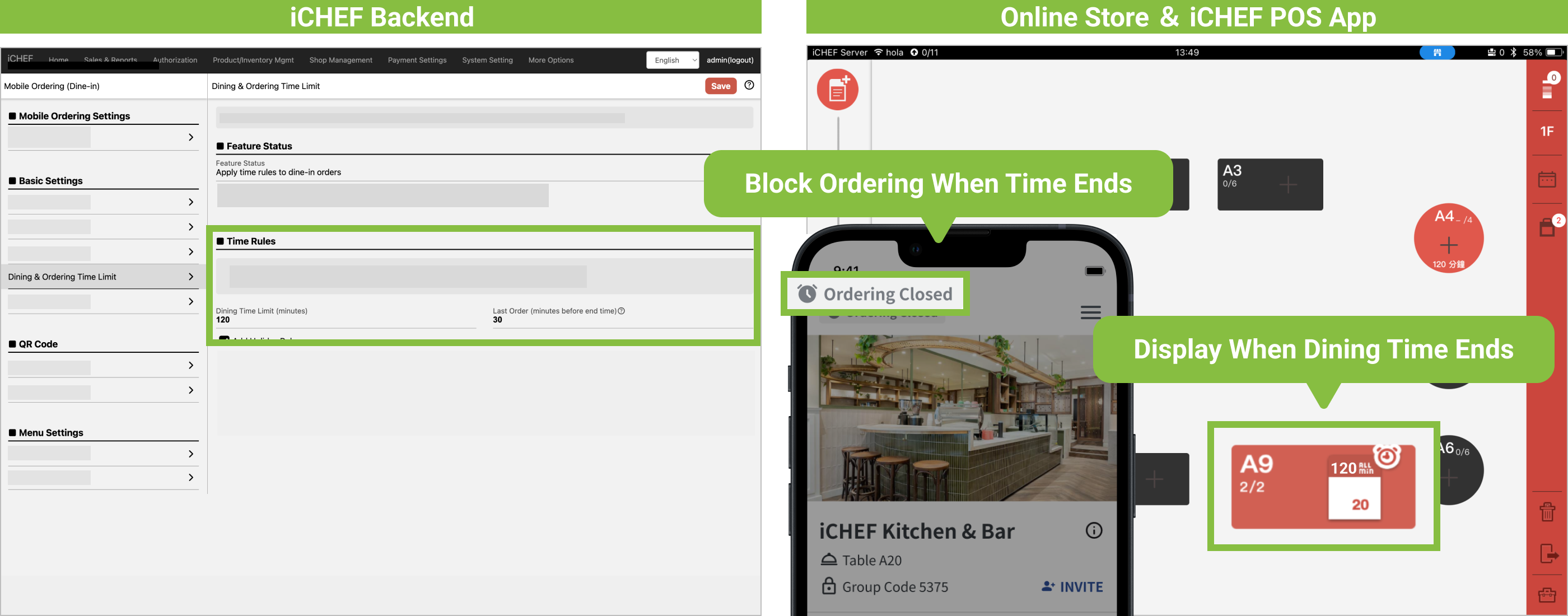
Setup Example:
- Store Rule: Dining time limit of 120 minutes, want guests to finish adding items 30 minutes before leaving.
- Backend Time Setting: Dining time limit 120 minutes; Last Order 30 minutes.
- Display Result:
- Display Result: When the group has been seated for 90 minutes (30 minutes before dining ends), the iCHEF Online Store website automatically blocks online ordering.
- When the group has been seated for 120 minutes, the POS table automatically shows a timer.
Usage ❷ Flexible Weekday/Holiday Switching
Custom time rules automatically adjust, and can be manually enabled/disabled as needed
➜ Maintains operational flexibility, suitable for various scenarios.
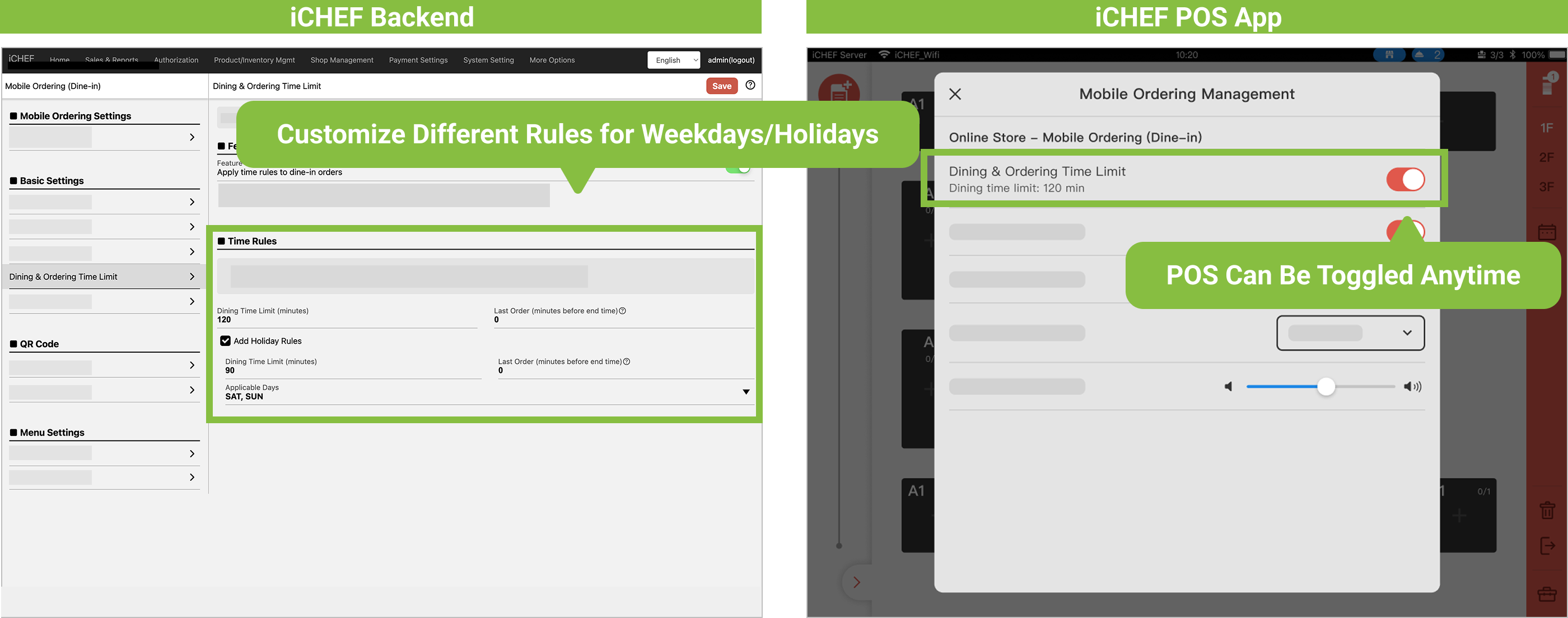
Setup Example:
- Store Rule: On weekdays, limit to 120 minutes only when full; on holidays, limit to 90 minutes.
- Backend Time Setting: Weekday Dining Time Limit 120 minutes; Holiday Dining Time Limit 90 minutes.
- Display Result:
- When the group has been seated for 120 minutes, the iCHEF Online Store website automatically blocks online ordering and a timer automatically shows on the POS table.
- If the store isn’t full, the time limit can be turned off anytime on the POS.