
After setting fixed [Reservable Dining Time Slots], you can also adjust for specific days (e.g., Store Holidays, Consecutive Holidays) to [Full Day Unavailable for Reservation] or [Custom Time Slot Reservation Availability], which will override the original fixed slots.
Whether it’s in-store POS reservations or the reservation website, the system will synchronize updates and display indicators.

Backend Settings
➤ Backend Path:Online Store > Reservation > Reservation Rules > Special Days
- Step 1: On this page, tap [Add] or [Action: Edit/Duplicate Icon] to the right of “[Special Reservation Date]”, to enter the settings.
- Step 2: Select “Start Date” and “End Date”.
- Multiple Days: Select from the first day to the last day.
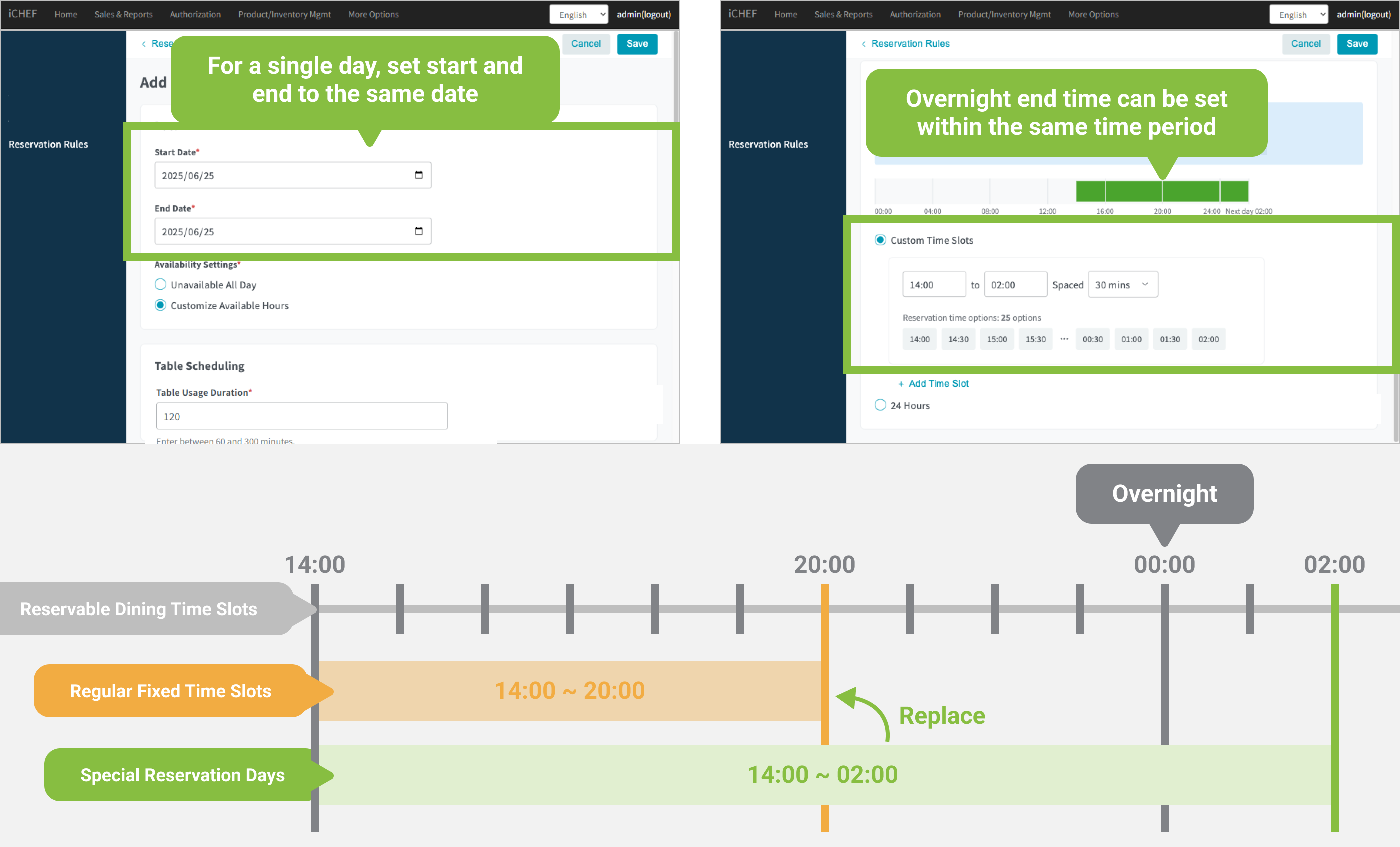
- Single Day: Regardless of whether there’s overnight business, select the same day for both the Start Date and End Date.
- Step 3: Reservation Settings
- Full Day Unavailable for Reservation
- Custom Time Slot Reservation Availability: You can set different [Table Usage Duration] and [Reservable Dining Time Slots] for this date.
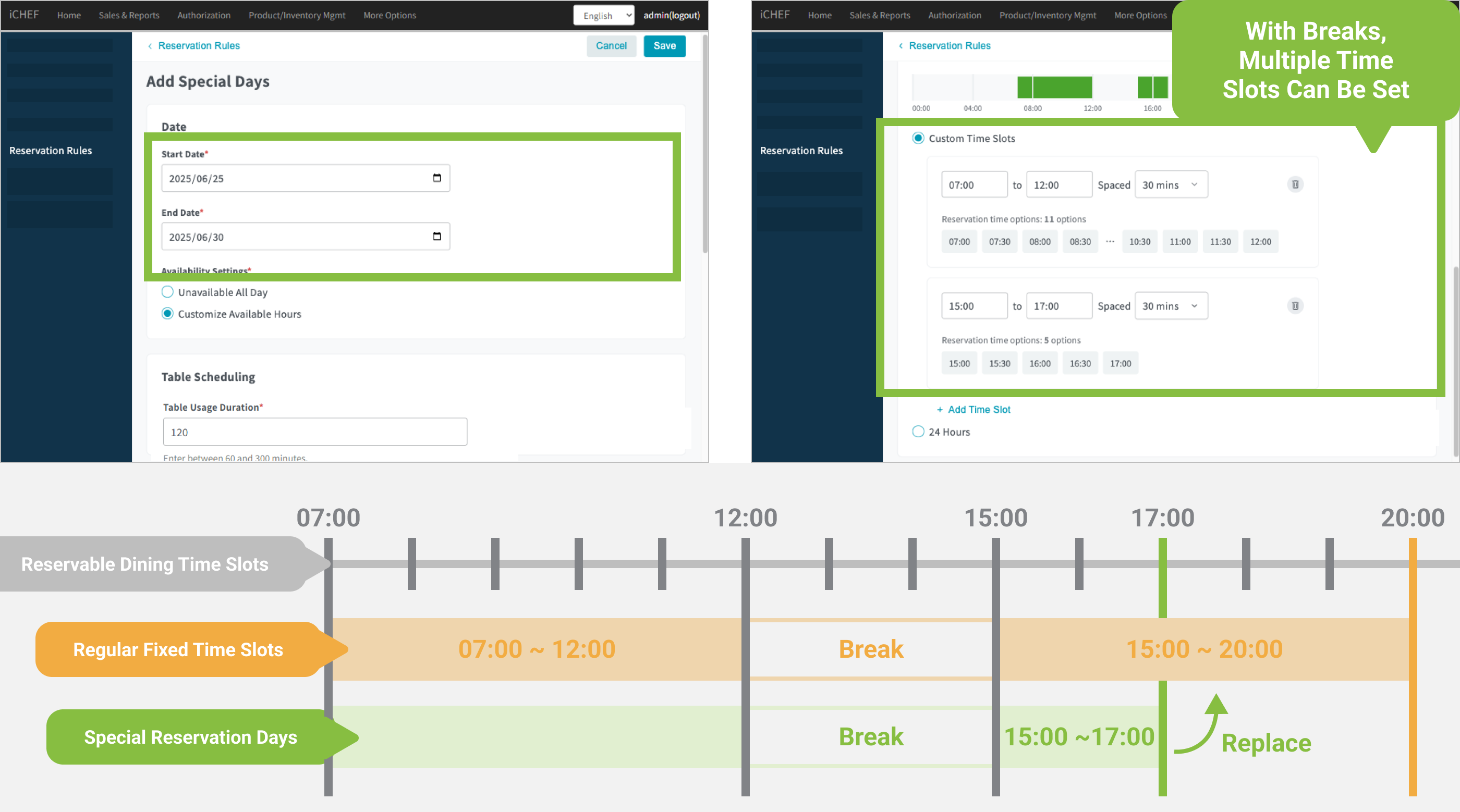
- Custom Slots: Set start/end times and option intervals. If there are multiple slots, you can tap the [+] below to add more.
- 24 Hours: Sets it to operate all day.

Saving will take effect immediately. The set [Special Reservation Date] slots will override the usual fixed slots, making them available for customers to book.
- Fixed Reservable Dining Time Slots: Daily 14:00 ~ 20:00
- Special Reservation Date: New Year’s Eve, wanting to extend business until 02:00 AM.
Special Business Day Setting Method:
- Start Date: 12/31
- End Date: 12/31
- Reservable Dining Time Slots: 14:00 ~ 02:00 (will override the usual fixed slots).
- Fixed Reservable Dining Time Slots: Daily 07:00 ~ 12:00; 15:00 ~ 20:00.
- Special Reservation Date: During Lunar New Year, only open until 17:00 in the afternoon.
Special Business Day Setting Method:
- Start Date: 02/09 (Lunar New Year’s Eve)
- End Date: 02/13 (Fourth Day of Lunar New Year)
- Reservable Dining Time Slots: 07:00 ~ 12:00 (no adjustment); 15:00 ~ 17:00 (adjusted).
(This setting will override the entire day’s fixed slots; therefore, if the morning slots are not adjusted, the original slots must also be added here.)
Reservation Screen Indicators
Once set, the reservation website will automatically update to the [Special Reservation Date] slots, so you don’t have to worry about customers making mistakes. The iCHEF system will also have the following indicators, making it easier for operational partners to distinguish.
POS Reservation Management
- Timeline Indicator: Unavailable booking slots will be marked with a gray diagonal line in [Timeline] mode.
- Date Tag: Displayed to the right of the date.
- Special Reservation Date: Dates where [Custom Time Slot Reservation Availability] has been added in the backend.
- Not Available for Reservation: Dates with default backend unavailable slots or where [Full Day Unavailable for Reservation] has been added.
- Calendar Indicator: If the time slot is unavailable for reservation, it will be marked as [Unavailable] on the calendar.
- Reservation Conflict: Displayed when an existing reservation conflicts with a [Special Reservation Date], appearing at the top of Reservation management.

After the set date ends, in the iCHEF POS App [Reservation], you can still view [Special Reservation Date] indicators within 6 months (186 days).
Backend Reservation List
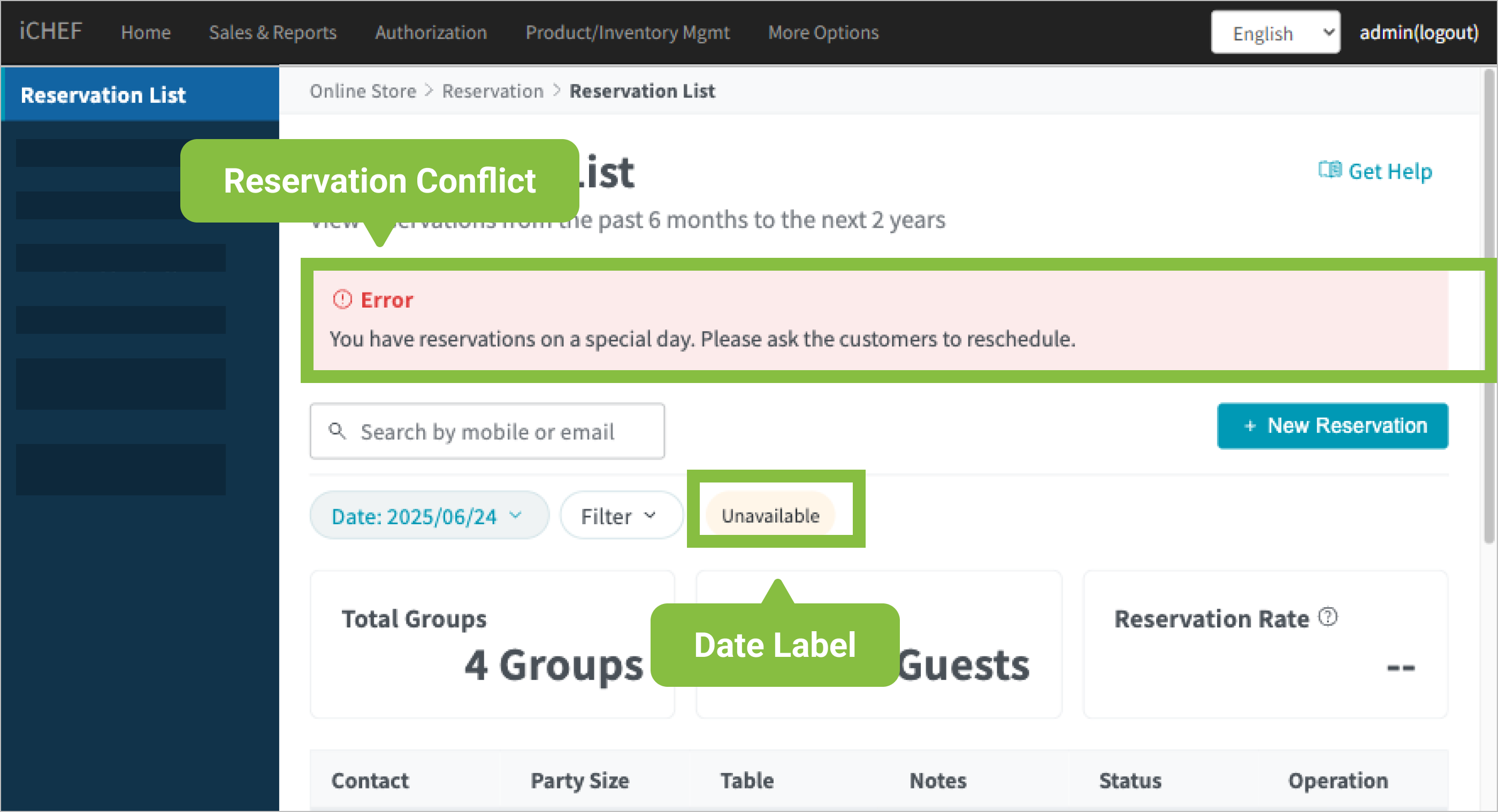
- Reservation Conflict: Displayed when an existing reservation conflicts with a [Special Reservation Date], a notification will be displayed at the top.
- Date Tag: After selecting a date, the right side will display a tag based on your settings.
- Special Reservation Date: Dates where [Custom Time Slot Reservation Availability] has been added in the backend.
- Not Available for Reservation: Dates with default backend unavailable slots or where [Full Day Unavailable for Reservation] has been added.
Not Available for Reservation: Dates with default backend unavailable slots or where [Full Day Unavailable for Reservation] has been added.