
Effectiveness Reminder
If there are more than 300 orders, a prompt will be displayed and guide you to use the express checkout tool to remove orders that have exceeded the pickup/delivery time.

Close An Order Manually
Once the meal has been picked up, you can close the order by:
Order Closing Express
When there are a large number of orders in the takeout/delivery area, you can use the express outbound tool to leave the store at one time, and the execution speed of the express store is related to the performance of the iPad and the number of orders to be shipped out of the store, and the handset will be temporarily unavailable when the express outbound execution is performed, so it is recommended that the time to perform the express exit is empty or after the account is closed.
- Go to Toolbox > Order Express Exit
- Tap [Start takeout/delivery orders express exit]

- You can filter the orders that are to be closed by order source or when the order is completed.
- Order source: filter by walk in, online store, or third-party delivery platform
- Order Completion Time: You can set your own filtering time, and this time is judged by the time shown in the order list in the takeaway/delivery area
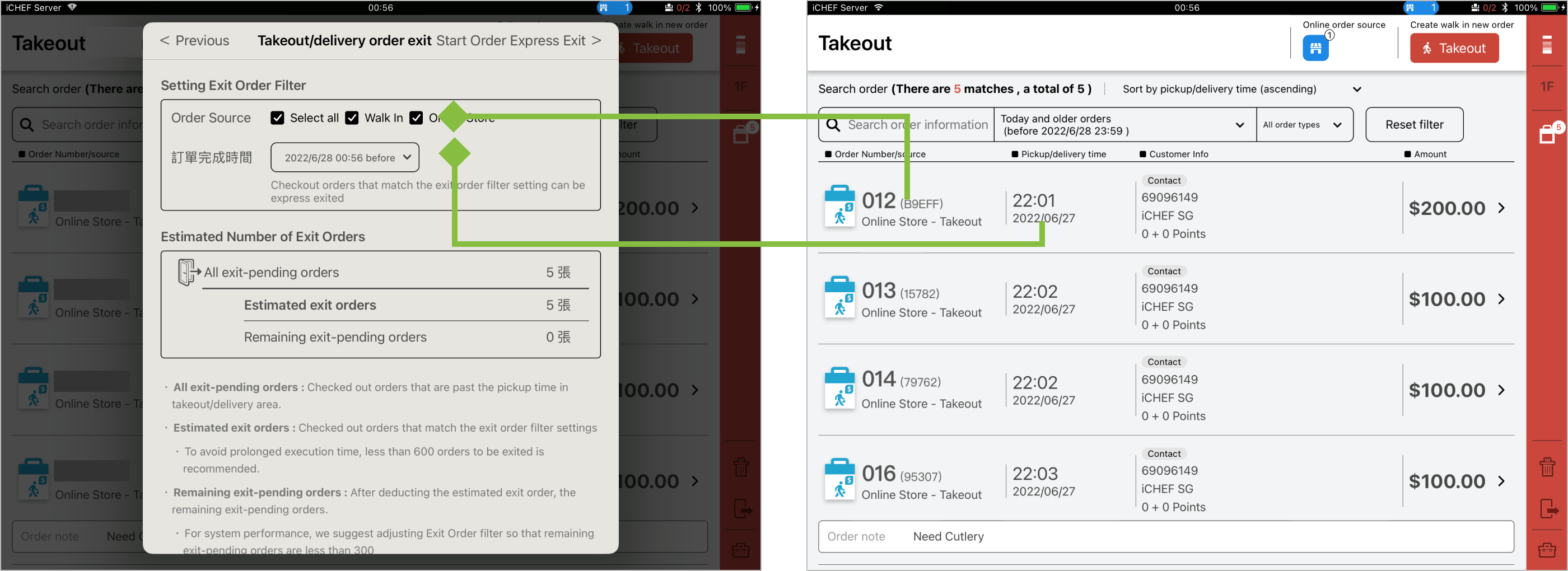
Lack of delivery time, orders from GrabFood will be filtered by the time order being sent.
- Tap [Start Order Express Exit] and enter passcode. Please do not close iCHEF POS during the process.
- The default permission to perform express delivery is Admin, if you want to adjust the permission, please go to Account and Permissions > Edit Permissions to adjust the order express delivery

If you need to query the employees who perform the express exit and the execution of the store filtering conditions, you can go to the business report > permission record query.

Close An Order Automatically
At present, the orders that support automatic out-of-store are real-time orders for on-site take-out instant orders and take-out orders (online checkout is not used), and the rest of the orders include third-party delivery platforms and are not within the scope of automatic checkout, except for Uber Eats orders that are not affected by the automatic checkout setting, and will be automatically shipped out of the store when the Uber Eats delivery person completes the order.
- Please go to Store Management > Store Processes and Alerts
- Toggle on [Take out automatically] under Takeout area setting
