
Have a quick view of your stock by checking your inventory records, and have a better vendor management.
How to Read It
Inventory Records: Check the detail of every inventory changes. / Inventory Status: Current inventory level.
Inventory Status
Current inventory level.
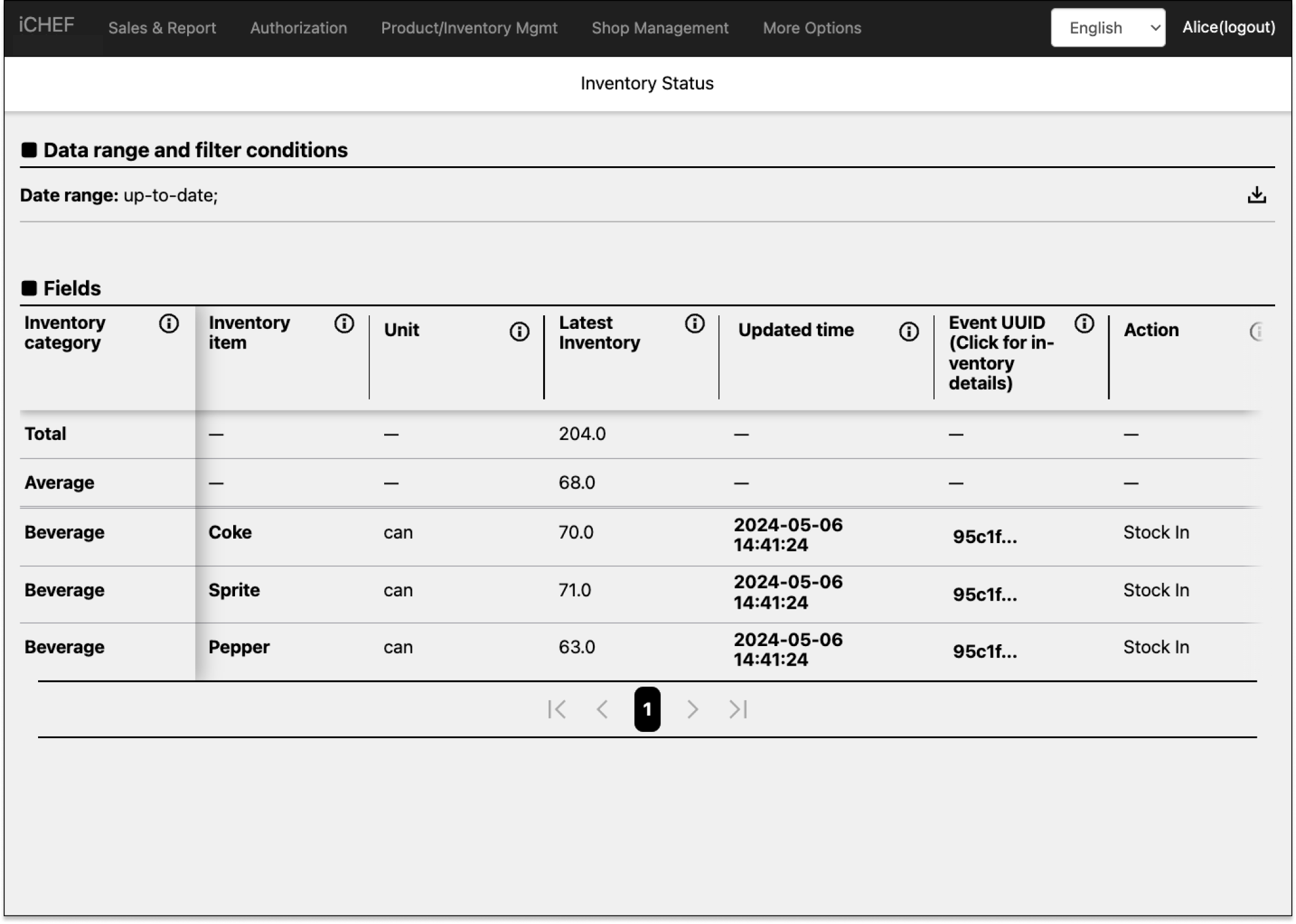
Display only the records within the time range of the filter.
Inventory items
- Definition: Item name.
- Formula: N/A
- Additional Info: Set up Inventory
Unit
- Definition: The unit you entered when adding this item (e.g. can, kg, package…etc.)
- Formula: N/A
- Additional Info: Set up Inventory
Latest Inventory
- Definition: Current Stock Level
- Formula: N/A
- Additional Info: N/A
Updated time
- Definition: Time of the latest updates.
- Formula: N/A
- Additional Info: N/A
Event UUID
- Definition: An unique number of each operation event.
- Formula: N/A
- Additional Info: The records is based on the UUID. You can still adjust the item’s name.
Action
- Definition: Type of last inventory operation event
- Formula: N/A
- Additional Info: How to Count Inventory
Staff
- Definition: The staff identified by the 4-digit employee ID.
- Formula: N/A
- Additional Info:Create Accounts & Groups
Notes
- Definition: Notes for the last record.
- Formula: N/A
- Additional Info: Inventory Management
Inventory Records
Check the detail of every inventory changes.
How to Read It
Filter the records by inventory item, category, or changing events.
Filters
Click on the pen icon to open the filter. You can filter data within a range of up to 93 days.

Group Summary Settings
Inventory item category
Categorize the records by [inventory item category].

庫存類別
- 欄位說明:庫存品項皆需放置於庫存類別中,此欄位顯示庫存類別的名稱
- 計算公式:無
- 補充資訊:更多的操作說明,請前往查看 庫存功能
進退貨金額變動
- 欄位說明:指定時間範圍內,進退貨金額的加總
- 計算公式:無
- 補充資訊:增加為正數,減少為負數
進貨金額
- 欄位說明:庫存品項進貨時,所產生的成本
- 計算公式:進貨量X進貨單價單
- 補充資訊:無
退貨金額
- 欄位說明:庫存品項退貨時,所產生的成本
- 計算公式:退貨量X退貨單價
- 補充資訊:無
消耗價值
- 欄位說明:庫存品項消耗時,所產生的成本
- 計算公式:消耗量X平均庫存單位價值
- 補充資訊:無
報廢價值
- 欄位說明:庫存品項報廢時,所產生的成本
- 計算公式:報廢量X平均庫存單位價值
- 補充資訊:無
盤差價值
- 欄位說明:盤點時與系統紀錄的數量不同,而導致成本減少或增加
- 計算公式:盤差量X平均庫存單位價值
- 補充資訊:無
用量價值
- 欄位說明:庫存品項消耗時,所產生的成本
- 計算公式:用量X平均庫存單位價值
- 補充資訊:無
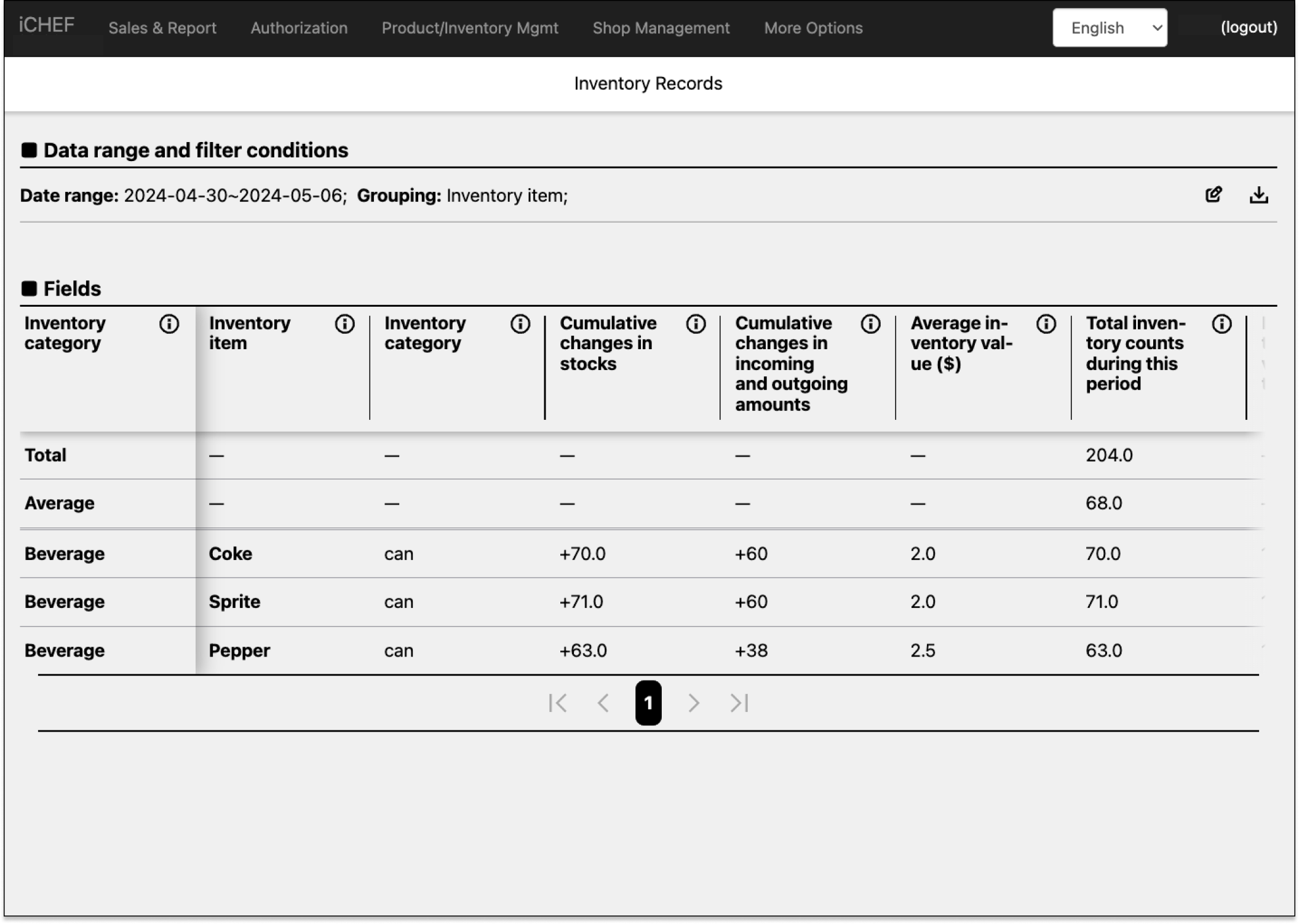
Inventory item
Categorize the records by [inventory item].
庫存類別
- 欄位說明:庫存品項皆需放置於庫存類別中,此欄位顯示庫存類別的名稱
- 計算公式:無
- 補充資訊:更多的操作說明,請前往查看 庫存功能
Inventory items
- Definition: Item name.
- Formula: N/A
- Additional Info: Set up Inventory
Unit
- Definition: The unit you entered when adding this item (e.g. can, kg, package…etc.)
- Formula: N/A
- Additional Info: Set up Inventory
庫存存量變化
- 欄位說明:指定時間範圍內,庫存存量因各項庫存操作而發生改變時計算存量變化
- 計算公式:無
- 補充資訊:增加為正數,減少為負數
進退貨金額變動
- 欄位說明:指定時間範圍內,進退貨金額的加總
- 計算公式:無
- 補充資訊:增加為正數,減少為負數
平均庫存單位價值
- 欄位說明:包含進退貨資料,計算出平均單位價值
- 計算公式:無
- 補充資訊:無
Latest Inventory
- Definition: Current Stock Level
- Formula: N/A
- Additional Info: N/A
最後庫存量結算價值
- 欄位說明:庫存量的價值
- 計算公式:最後庫存量 × 平均庫存單位價值
- 補充資訊:無
進貨量
- 欄位說明:從 iCHEF POS 執行庫存進貨時所產生的數量
- 計算公式:無
- 補充資訊:無
平均退貨單價
- 欄位說明:指定時間範圍內,每次進貨時的資訊加總後計算進貨的平均金額
- 計算公式:進貨總金額 / 進貨總數量
- 補充資訊:無
進貨金額
- 欄位說明:庫存品項進貨時,所產生的成本
- 計算公式:進貨量X進貨單價單
- 補充資訊:無
退貨量
- 欄位說明:從 iCHEF POS 執行庫存退貨時所產生的數量
- 計算公式:無
- 補充資訊:無
平均退貨單價
- 欄位說明:指定時間範圍內,每次退貨時的資訊加總後計算退貨的平均金額
- 計算公式:退貨總金額 / 退貨總數量
- 補充資訊:無
退貨金額
- 欄位說明:庫存品項退貨時,所產生的成本
- 計算公式:退貨量X退貨單價
- 補充資訊:無
消耗量
- 欄位說明:從 iCHEF POS 手動輸入消耗,或自動在出單後自動消耗庫存的數量加總
- 計算公式:無
- 補充資訊:無
消耗價值
- 欄位說明:庫存品項消耗時,所產生的成本
- 計算公式:消耗量X平均庫存單位價值
- 補充資訊:無
報廢量
- 欄位說明:從 iCHEF POS 執行庫存報廢時所產生的數量
- 計算公式:無
- 補充資訊:無
報廢價值
- 欄位說明:庫存品項報廢時,所產生的成本
- 計算公式:報廢量X平均庫存單位價值
- 補充資訊:無
最後盤點量
- 欄位說明:最後一次盤點的數量
- 計算公式:無
- 補充資訊:無
盤差量
- 欄位說明:盤差是在做庫存清點時,因清點的庫存品項數量與系統計算數量不同而出現的差別
- 計算公式:盤點後的數量 – 當時庫存量
- 補充資訊:無
盤差價值
- 欄位說明:盤點時與系統紀錄的數量不同,而導致成本減少或增加
- 計算公式:盤差量X平均庫存單位價值
- 補充資訊:無
用量
- 欄位說明:用量是指庫存品項進貨後,由銷售商品的消耗與過期報廢計算後的數量
- 計算公式:消耗量 + 報廢量 – 盤差量
- 補充資訊:無
用量價值
- 欄位說明:庫存品項消耗時,所產生的成本
- 計算公式:用量X平均庫存單位價值
- 補充資訊:無
Inventory operation events (1st one)
Categorize the records by [inventory changing events].
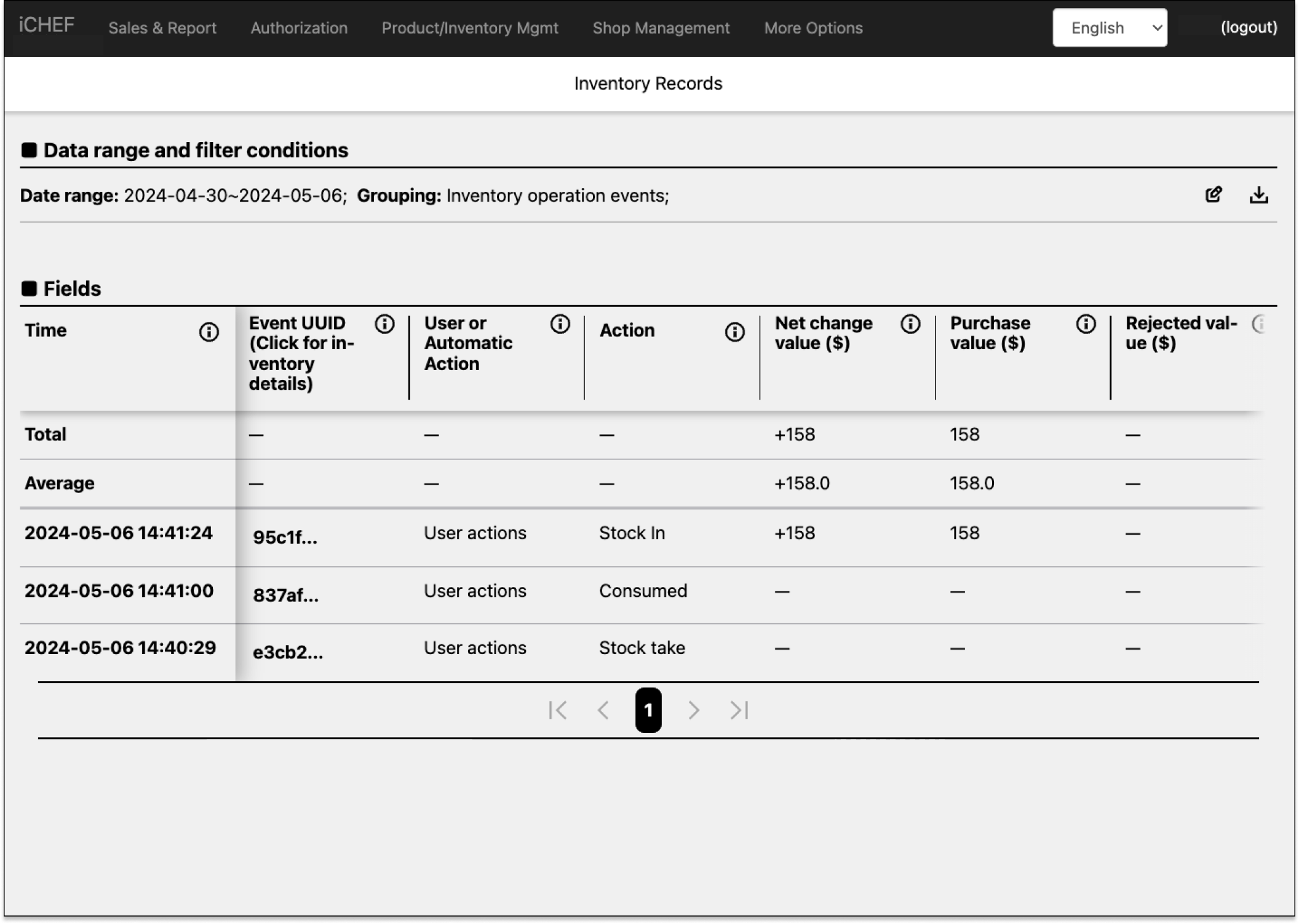
Time
- Field Description: The time this action was performed
- Calculation Formula: None
- Additional Info: None
Event UUID
- Definition: An unique number of each operation event.
- Formula: N/A
- Additional Info: The records is based on the UUID. You can still adjust the item’s name.
Action
- Definition: Type of last inventory operation event
- Formula: N/A
- Additional Info: How to Count Inventory
進退貨金額變動
- 欄位說明:指定時間範圍內,進退貨金額的加總
- 計算公式:無
- 補充資訊:增加為正數,減少為負數
進貨金額
- 欄位說明:庫存品項進貨時,所產生的成本
- 計算公式:進貨量X進貨單價單
- 補充資訊:無
退貨金額
- 欄位說明:庫存品項退貨時,所產生的成本
- 計算公式:退貨量X退貨單價
- 補充資訊:無
消耗價值
- 欄位說明:庫存品項消耗時,所產生的成本
- 計算公式:消耗量X平均庫存單位價值
- 補充資訊:無
報廢價值
- 欄位說明:庫存品項報廢時,所產生的成本
- 計算公式:報廢量X平均庫存單位價值
- 補充資訊:無
盤差價值
- 欄位說明:盤點時與系統紀錄的數量不同,而導致成本減少或增加
- 計算公式:盤差量X平均庫存單位價值
- 補充資訊:無
用量價值
- 欄位說明:庫存品項消耗時,所產生的成本
- 計算公式:用量X平均庫存單位價值
- 補充資訊:無
Staff
- Definition: The staff identified by the 4-digit employee ID.
- Formula: N/A
- Additional Info:Create Accounts & Groups
訂單種類
- 欄位說明:顯示訂單為內用、外帶或是外送
- 計算公式:無
- 補充資訊:無
原始單號
- 欄位說明:iCHEF POS 的訂單流水號
- 計算公式:無
- 補充資訊:每次關帳或安全重置後,流水號會重新計算
Notes
- Definition: Notes for the last record.
- Formula: N/A
- Additional Info: Inventory Management
Inventory operation events (2nd one)
Categorize the records by individual inventory item changes.

Time
- Field Description: The time this action was performed
- Calculation Formula: None
- Additional Info: None
Event UUID
- Definition: An unique number of each operation event.
- Formula: N/A
- Additional Info: The records is based on the UUID. You can still adjust the item’s name.
紀錄產生方式(庫存)
Action
- Definition: Type of last inventory operation event
- Formula: N/A
- Additional Info: How to Count Inventory
庫存類別
- 欄位說明:庫存品項皆需放置於庫存類別中,此欄位顯示庫存類別的名稱
- 計算公式:無
- 補充資訊:更多的操作說明,請前往查看 庫存功能
Unit
- Definition: The unit you entered when adding this item (e.g. can, kg, package…etc.)
- Formula: N/A
- Additional Info: Set up Inventory
庫存量變動
- 欄位說明:庫存因進貨、消耗 … 等操作而導致的庫存數量改變
- 計算公式:無
- 補充資訊:無
進退貨金額變動
- 欄位說明:指定時間範圍內,進退貨金額的加總
- 計算公式:無
- 補充資訊:增加為正數,減少為負數
平均庫存單位價值
- 欄位說明:包含進退貨資料,計算出平均單位價值
- 計算公式:無
- 補充資訊:無
Latest Inventory
- Definition: Current Stock Level
- Formula: N/A
- Additional Info: N/A
最後庫存量結算價值
- 欄位說明:庫存量的價值
- 計算公式:最後庫存量 × 平均庫存單位價值
- 補充資訊:無
進貨量
- 欄位說明:從 iCHEF POS 執行庫存進貨時所產生的數量
- 計算公式:無
- 補充資訊:無
進貨金額
- 欄位說明:庫存品項進貨時,所產生的成本
- 計算公式:進貨量X進貨單價單
- 補充資訊:無
退貨量
- 欄位說明:從 iCHEF POS 執行庫存退貨時所產生的數量
- 計算公式:無
- 補充資訊:無
平均退貨單價
- 欄位說明:指定時間範圍內,每次退貨時的資訊加總後計算退貨的平均金額
- 計算公式:退貨總金額 / 退貨總數量
- 補充資訊:無
退貨金額
- 欄位說明:庫存品項退貨時,所產生的成本
- 計算公式:退貨量X退貨單價
- 補充資訊:無
消耗量
- 欄位說明:從 iCHEF POS 手動輸入消耗,或自動在出單後自動消耗庫存的數量加總
- 計算公式:無
- 補充資訊:無
消耗價值
- 欄位說明:庫存品項消耗時,所產生的成本
- 計算公式:消耗量X平均庫存單位價值
- 補充資訊:無
報廢量
- 欄位說明:從 iCHEF POS 執行庫存報廢時所產生的數量
- 計算公式:無
- 補充資訊:無
報廢價值
- 欄位說明:庫存品項報廢時,所產生的成本
- 計算公式:報廢量X平均庫存單位價值
- 補充資訊:無
最後盤點量
- 欄位說明:最後一次盤點的數量
- 計算公式:無
- 補充資訊:無
盤差量
- 欄位說明:盤差是在做庫存清點時,因清點的庫存品項數量與系統計算數量不同而出現的差別
- 計算公式:盤點後的數量 – 當時庫存量
- 補充資訊:無
盤差價值
- 欄位說明:盤點時與系統紀錄的數量不同,而導致成本減少或增加
- 計算公式:盤差量X平均庫存單位價值
- 補充資訊:無
用量
- 欄位說明:用量是指庫存品項進貨後,由銷售商品的消耗與過期報廢計算後的數量
- 計算公式:消耗量 + 報廢量 – 盤差量
- 補充資訊:無
用量價值
- 欄位說明:庫存品項消耗時,所產生的成本
- 計算公式:用量X平均庫存單位價值
- 補充資訊:無
Staff
- Definition: The staff identified by the 4-digit employee ID.
- Formula: N/A
- Additional Info:Create Accounts & Groups
訂單種類
- 欄位說明:顯示訂單為內用、外帶或是外送
- 計算公式:無
- 補充資訊:無
原始單號
- 欄位說明:iCHEF POS 的訂單流水號
- 計算公式:無
- 補充資訊:每次關帳或安全重置後,流水號會重新計算
Notes
- Definition: Notes for the last record.
- Formula: N/A
- Additional Info: Inventory Management