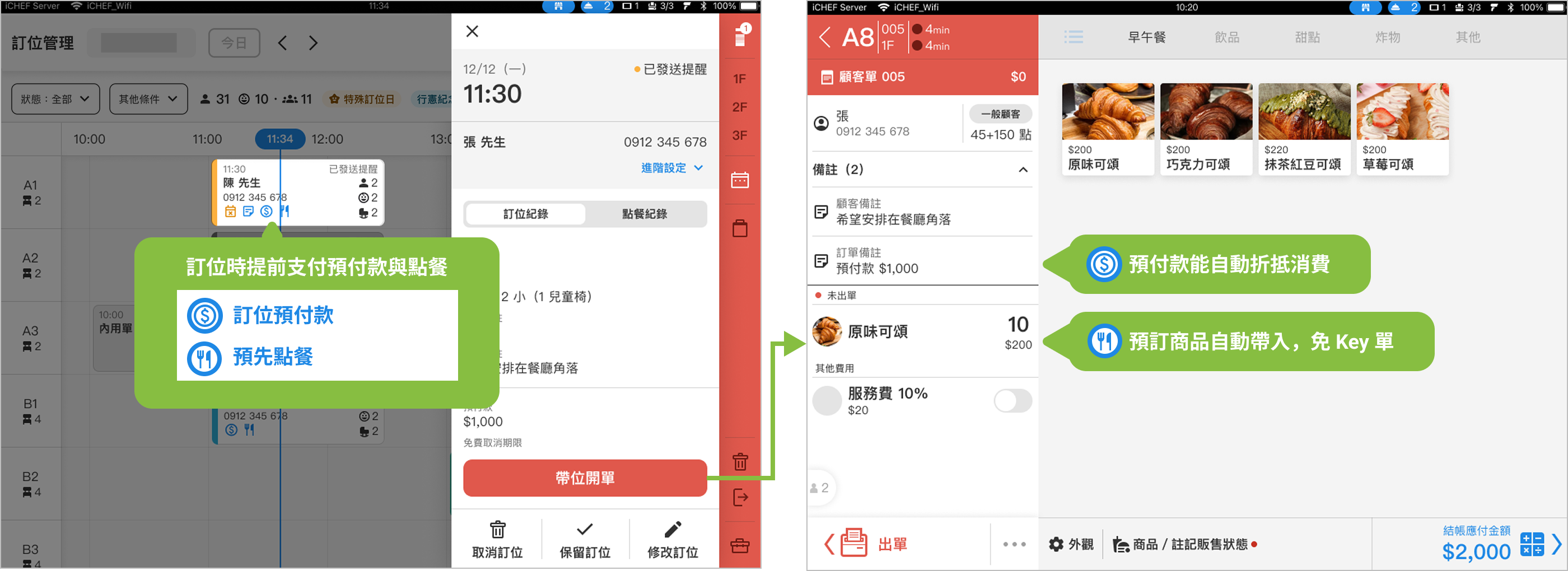
Always worried about “no-shows” leaving seats empty? By enabling iCHEF’s reservation prepayment feature, you can set conditions for consumers to pay part of the amount online, which will automatically be deducted at checkout, effectively filtering out guests who will actually show up. Combined with the advantage of integrated online ordering and reservations, consumers can pre-order meals, and orders can be placed directly upon seating, reducing wait times and improving overall service efficiency.
➊ Flexible Charging Rules: Adjust Freely
Whether you want to charge a deposit based on the number of diners or pre-charge for meals, it’s all possible!
Three prepayment modes, flexible switching, and easy setup allow you to adapt to any changes in restaurant operations.

Deposit
charged based on the number of diners
For restaurants with limited seating or those that frequently host large gatherings, collecting a deposit during reservations effectively increases attendance rates.
Pre-ordering
charged based on meal amount
Suitable for restaurants with complex meal preparation processes or short shelf-life ingredients, allowing for advance preparation and precise ingredient management.
Deposit + Pre-ordering
Flexible charging based on number of diners or meal amount
Combining the advantages of both deposit and pre-ordering modes, it meets various needs and adapts to different scenarios.
➋ Support Pre-ordering: Enhance Meal Preparation Efficiency
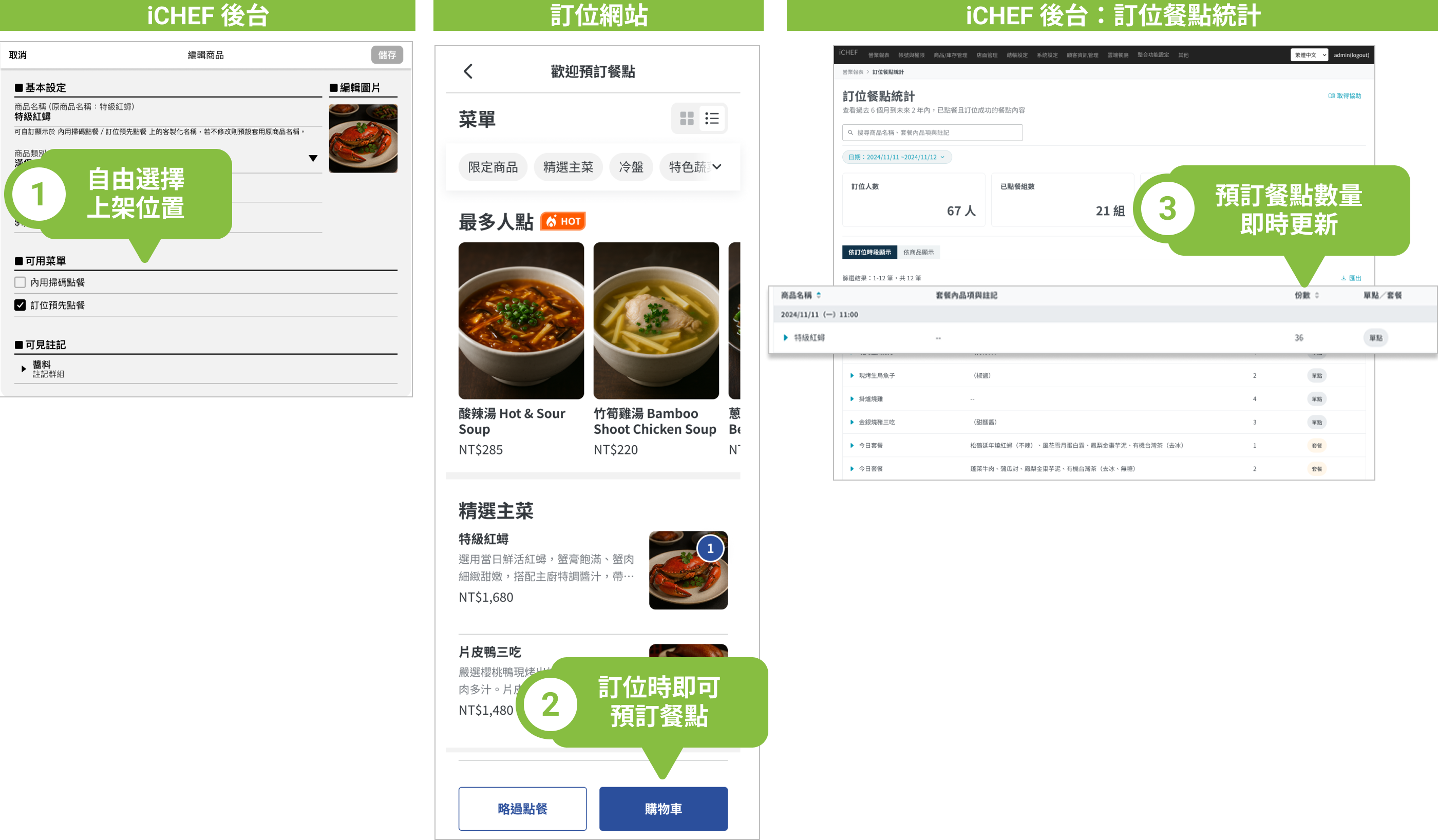
Limited supply or special dishes that require pre-ordering can be listed on a dedicated pre-order menu.
Subsequently, through the “Reservation Meal Statistics Report”, you can plan meal preparation and ingredient usage in advance, making operations more efficient.
| Product Type | Reason for Recommendation |
|---|---|
| Meals that require advance preparation | Prepare meals in advance to speed up serving and ensure smoother on-site service. |
| Ingredients that are difficult to preserve | Accurately estimate ingredient usage through reservation meal statistics, reducing waste and effectively controlling costs. |
| Best-selling items | Anticipate demand for popular dishes in advance to ensure stable supply and avoid stockouts on-site. |
| Limited edition dishes | Aggregate pre-order quantities at once to simplify meal preparation processes, allowing limited dishes to be supplied in a planned manner. |
➌ Integrate Online Payment: Eliminate Payment Barriers
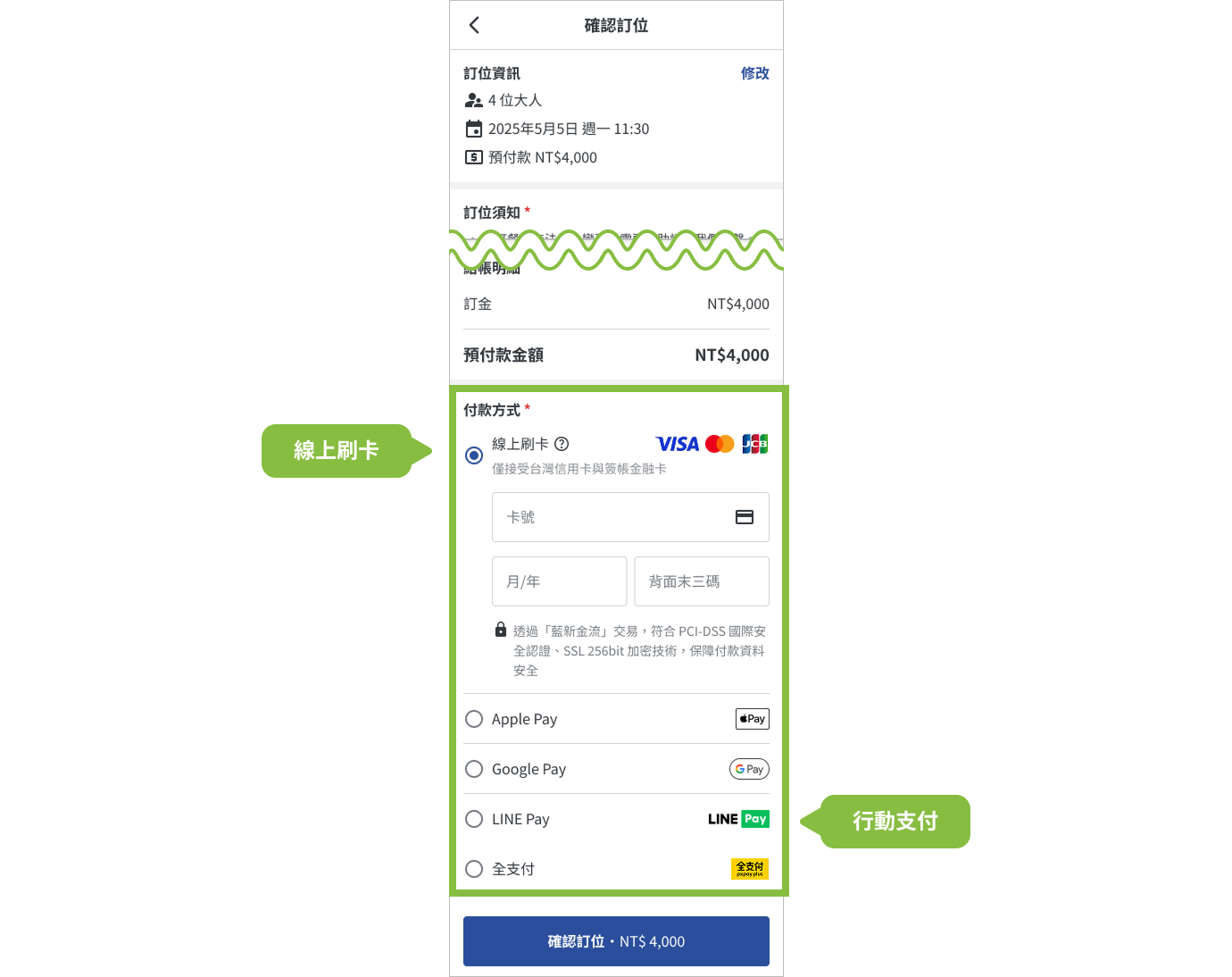
Reservation prepayment supports online credit card payments and various mobile payment methods.
Allow consumers to complete reservations and prepayments in one go, saving the restaurant from the hassle of confirming remittances and other complex reconciliation operations.
➍ Automatic Deduction at Checkout: No more Payment Errors
At checkout, the prepayment will automatically be deducted from the total amount, reducing manual verification and making checkout faster, more accurate, and secure.

➎ Reports & Records: Easy Estimation and Analysis
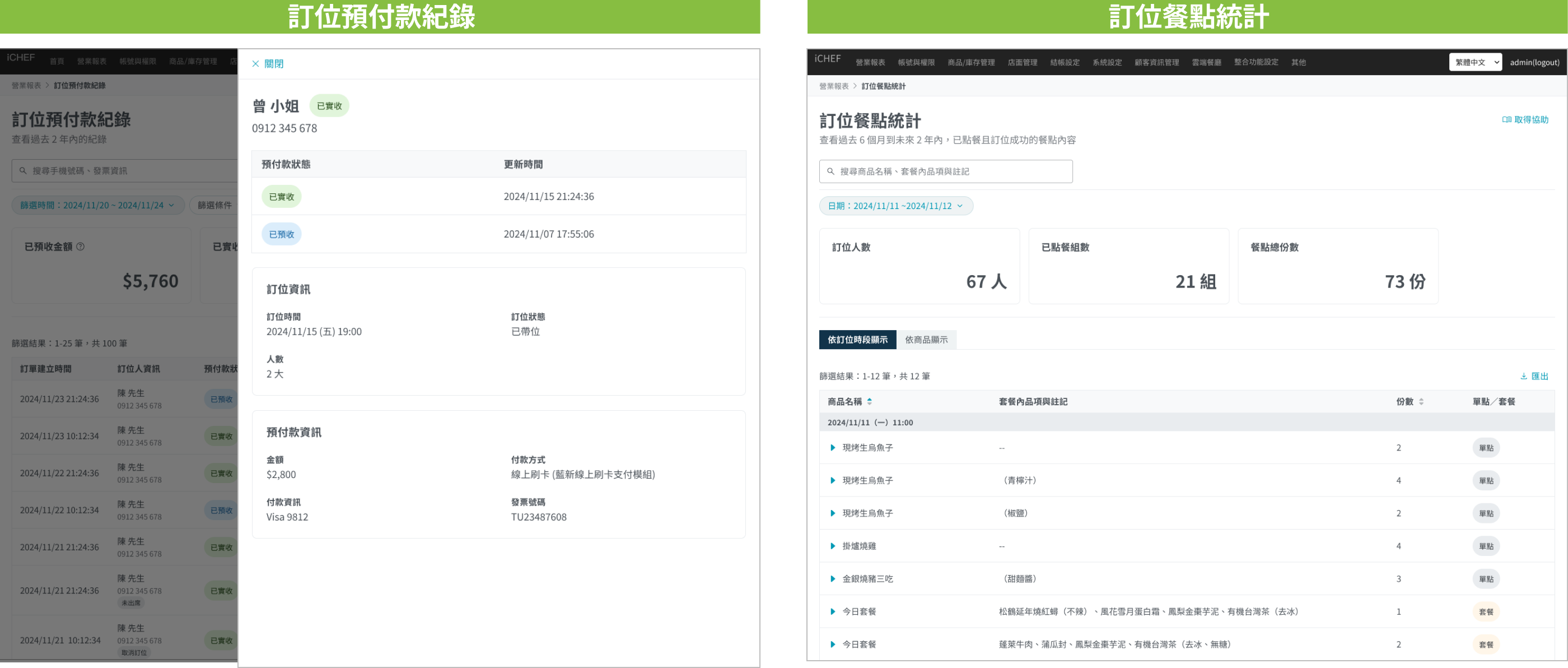
In addition to viewing the summary of pre-orders in the standard reservation list, both prepayments and pre-orders have dedicated statistical reports. These detailed records allow you to manage reservation statuses from different perspectives.
Period Overview
In the Reservation List on the Backend, you can view the summary of pre-order counts regardless of which view mode you are in.

Dedicated Reports
The system is fully automated, providing complete records for both “Reservation Deposit Records ” and “Reservation Pre-Order Meals” reports for future reference.
Usage Instructions
- Reservation prepayment must be provided through the online payment module for in-dining QR code ordering.
- In-dining QR code ordering must be set to “post-payment” mode to facilitate full deduction of prepayments during consumption.
- Module Usage:
- Reservation Management Module: Each reservation maintains a usage of 1 unit, with no additional calculations.
- Online Ordering Module: When reservations include pre-ordering, it counts as 1 unit of usage, with no additional calculations for subsequent in-dining orders.
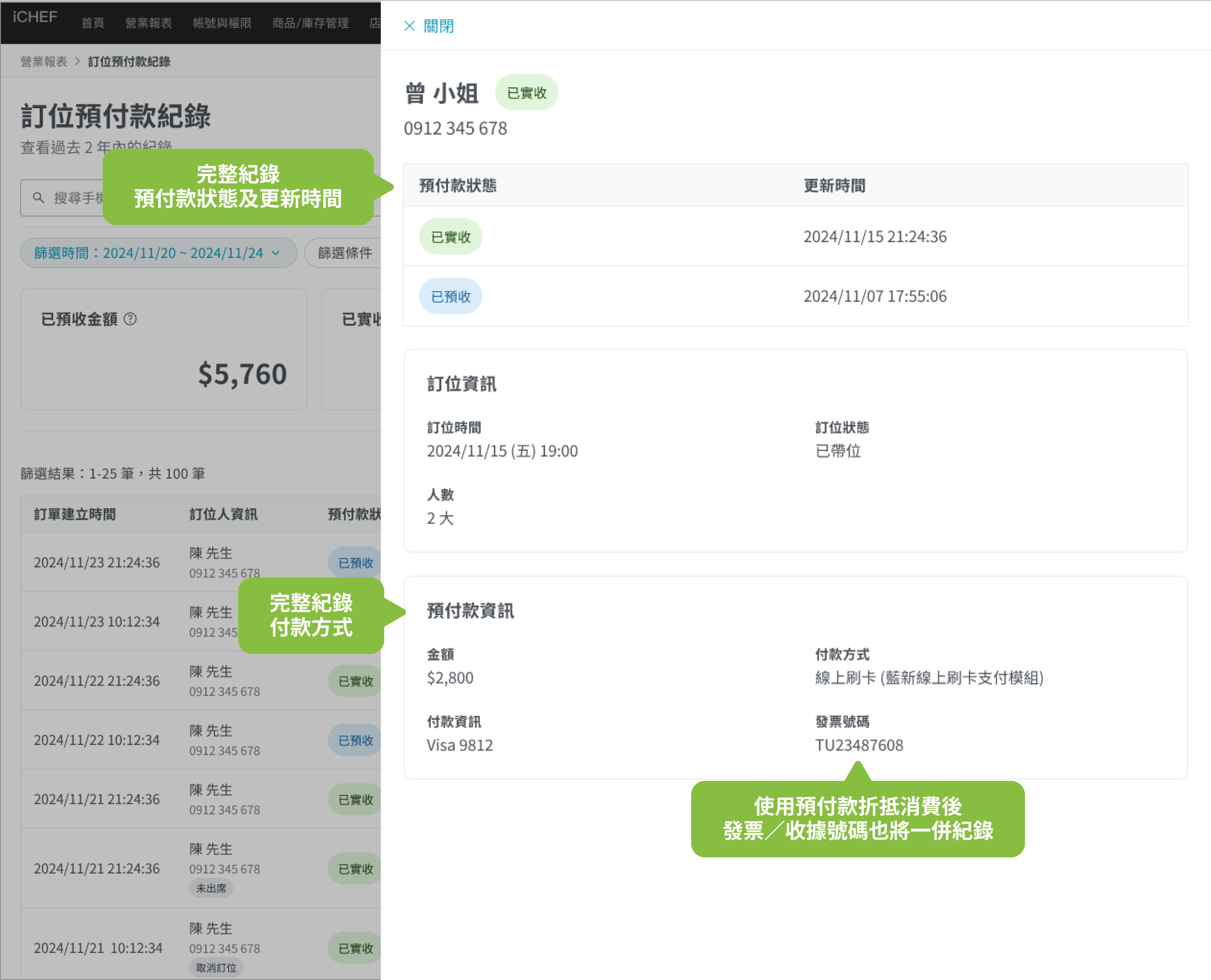
When consumers pay prepayments during reservations, third-party payment platforms (such as Neweb, LINE Pay, etc.) will immediately record the payment amount. However, iCHEF POS will only include it in actual revenue when the prepayment is deducted from consumption or not refunded (invoice/receipt issued), aligning more closely with the restaurant’s actual accounting.
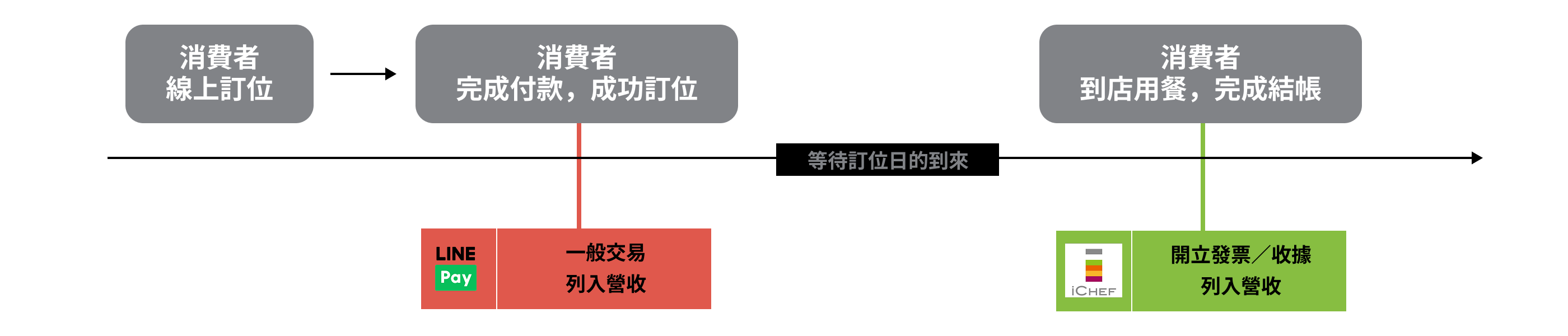
To ensure precise financial management, iCHEF will fully record the status and last update time of each prepayment, allowing for quick and accurate detail inquiries during subsequent audits.